
Whether your paper is empirical
This choice controls the later workflow. If you choose an empirical component, StudyTexter opens additional fields for methodology, design description, and empirical materials.
If you choose no empirical component, the later Empirical data step is skipped.
Document analysis or literature-based paper?
A literature-based paper uses academic literature to explain a topic or support arguments with sources.
Document analysis treats documents as data material. You analyze texts, cases, minutes, or websites systematically by criteria, categories, or patterns.
In short: if you use literature to justify your paper, it is usually literature-based. If you analyze documents themselves methodologically, it is more likely document analysis.
Which methodological approach to choose
In Methodological approach, you classify the basic logic of your empirical work. This affects how StudyTexter expects collection, material, analysis, and later results to work.
Methodological approach
Surveys & Interviews
Quantitative & qualitative surveys of people

Surveys & Interviews
Use this when you survey people, conduct interviews, work with focus groups, or analyze existing answers.
This fits standardized surveys, guided interviews, focus groups, and mixed methods.
Check whether StudyTexter should prepare a questionnaire, interview guide, transcripts, questionnaire results, or a result analysis.
Example topics
Typical situations: You want to understand how people assess a topic, what experiences they have had, or how often certain answers occur.
Example topics: How do employees evaluate hybrid work? Which factors influence purchase decisions in an online shop? How do teachers experience the use of AI in class? What expectations do customers have for sustainable packaging?
Materials that may be needed: Questionnaire, interview guide, consent form, transcripts, questionnaire results, codebook, category system, result analysis, or raw data export from a survey tool.
Methodological approach
Experiments & Observations
Controlled tests, simulations, or field observations

Experiments & Observations
Use this for controlled tests, simulations, observational studies, or measurement series.
This fits experiments, Monte Carlo simulations, field observations, lab setups, or systematic tests.
Important details are conditions, variables, data source, collection, and expected evaluation.
Example topics and use cases
Typical situations: You compare conditions, observe behavior, evaluate measurements, or simulate data to test methods, groups, or scenarios in a controlled way.
Example topics and use cases: A/B test: Which landing page variant leads to more signups? Observation: How do customers move through a sales area? Simulation: How robust are regression models with outliers? Field experiment: How does a reminder affect response rate?
Materials that may be needed: Experiment design, observation protocol, raw data, measurements, simulation script, variable description, evaluation tables, result analysis, or appendix material showing the setup.
Methodological approach
Document analysis
Analysis of existing texts, cases, or documents

Document analysis
Use this when existing texts, cases, minutes, laws, contracts, press articles, or other documents are analyzed systematically.
Document analysis focuses on existing materials rather than interviewing people.
The documents to be analyzed should be available as raw data or primary documents. Category systems, evaluation grids, or guides can help.
Example topics and use cases
Typical situations: You analyze documents not only as sources, but as the object of study. The important point is which criteria, codes, or comparison logic you use.
Example topics and use cases: How do parties present climate policy in election programs? Which patterns appear in support-ticket complaints? How do sustainability reports change over several years? Which argument patterns do newspaper articles use in a conflict?
Materials that may be needed: Primary documents, raw data, category system, evaluation grid, coding guide, case material, document collection, result analysis, or notes on the document selection.
Survey/Interview type
- Survey (Quantitative)
- Interviews / Focus group (Qualitative)
- Mixed methods
How to check the brief description
The brief description of the empirical design summarizes data source, collection, analysis, and expected results.
It later becomes the basis for methodology, empirical materials, and, if needed, simulated or prepared data.
- Is it clear where data, documents, answers, or simulation values come from?
- Is it described how the data are collected, generated, observed, or assembled?
- Is the evaluation logic or comparison perspective recognizable?
- Do assumptions and expected results fit the research question?
If you do not have real data yet
That is not automatically a problem. StudyTexter can work with planned, simulated, or later-to-be-checked data, depending on the project. What matters is that you make clear what already exists, what is still planned, and what may be simulated.
How to use your own materials
File upload answers: Which file is available?
The link in Empirical method answers: What role does this file play in the empirical design?
If you already have empirical materials, upload them first in File upload and mark them as Appendix & Empirical Material.
Then return to Empirical method. Under Empirical materials, choose the right material type and link the file via Linked upload.
If you add new files later, save File upload and click Regenerate in Empirical method.
1. Upload in File upload
Upload empirical files in File upload. Choose Appendix & empirical material when the file should be used as data basis, appendix, or empirical material.
Use Description / Notes to explain what the file contains, how it was collected, and whether it should be analyzed, only attached, or used as the basis for a material.
- Upload transcript, questionnaire, raw data, or category system
- Mark the file as Appendix & Empirical Material
- Explain the file's role in Description / Notes
- Choose the right material type under Empirical materials and link the upload
2. Link in Empirical method
Linked upload
No upload (will be generated/simulated) · Will be generated/simulated
3. Check afterwards
Check whether name, document type, notes, appendix selection, generate/simulate option, and linked upload fit together. If a real file exists, it should be linked. If StudyTexter should create the material first, generating or simulating it can make sense.
Which empirical materials matter
Under Empirical materials, you define which files or appendices are needed for the empirical component.
Some materials can be linked to existing uploads. Others can be generated or simulated by StudyTexter.
If your university expects a fixed appendix order, sort the entries here accordingly. A typical order is: consent form, questionnaire or guide, raw data or results, then evaluation or result analysis.
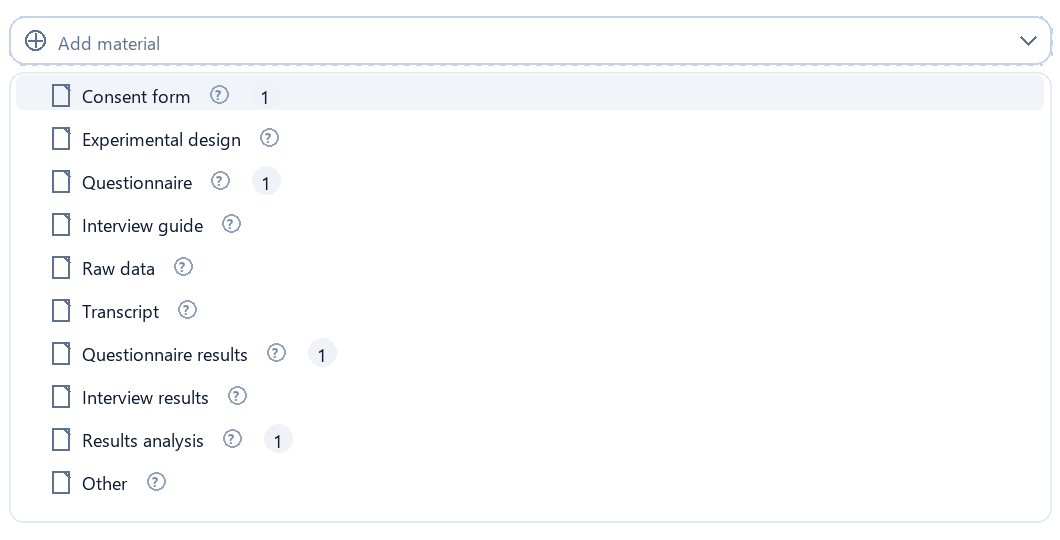
What can count as Other
- Photos of the experimental setup, room, or material
- Screenshots of tool settings or platform setups
- Approvals, ethics clearances, or field-access evidence
- Recruitment material such as invitation, poster, or flyer
- Participant information sheet or debriefing text
- Stimulus material such as images, texts, videos, or scenarios
- Supplementary graphics, floor plans, or process sketches
- Technical documentation for collection or export
Rule of thumb: if the file explains, proves, or documents how your empirical work came about, but is not itself the data or evaluation, it usually fits under Other.
Notes / Context
Use Description / Notes to explain what the file contains, how it was collected, and whether it should be analyzed, only attached, or used as the basis for a material.
When you should link an existing upload
Link an upload when the matching file has already been uploaded in File upload. This is useful for real transcripts, datasets, questionnaires, interview guides, raw documents, or existing result files. If no file exists, the material may remain generated or simulated depending on its type.
How StudyTexter uses these details
StudyTexter uses this step to classify the empirical component of your paper methodologically.
The more precisely you check empirics, method, brief description, and materials, the less you need to correct later in methodology, empirical data, results, and appendix.
- Empirical Yes/No decides whether Empirical data appears later.
- Methodological approach defines whether StudyTexter expects surveys, experiments, observations, simulations, or document analyses.
- Brief description becomes the basis for data source, collection, analysis, and expected results.
- Empirical materials control what appears in the appendix, what is generated or simulated, and which uploads serve as data basis.
Final checklist
Before you finish the step, check the most important decisions again, especially if you uploaded or later added your own empirical files.
Do not forget to save
If you change the empirical setup, materials, or linked uploads, save the step before moving on.