
The Best AI for Research: 11 Tools for Each Step of Your Paper
There is no single best AI for research. There is a best tool for each step: finding papers, reading them, checking the evidence, citing and writing. On Oct 12, 2026 we read the pricing and help pages of 11 tools, took dated screenshots, and checked with open data whether 500 newly registered papers have an abstract or a free full text in Semantic Scholar, a database that several of these tools use.

 Janosch & Dr. Jonathan SchulteStudyTexter editorial team
Updated
19 min read
Janosch & Dr. Jonathan SchulteStudyTexter editorial team
Updated
19 min readDisclosure: This comparison is published by StudyTexter, a company in the same market. We only state verifiable facts with source and date. Method
Contents
For finding papers, start free with Elicit (unlimited search in 138 million papers) or Consensus (Pro $20 a month, up to 40% off for students). For mapping a field, use ResearchRabbit or Connected Papers; for reading your PDFs, Gemini Notebook. For writing the paper, StudyTexter is our pick: every citation in the draft shows the source and page number, steps 1 to 5 are free, and a package costs from $79 once. Our test: 477 of 500 newly registered papers were in Semantic Scholar, but 35% of those (166) had no abstract in its open API.
Best AI for research: our pick for each step
A research paper has five steps, and each step needs a different kind of tool. The table shows our free and paid pick for each step. Below, every tool has a card with its price as shown on Oct 12, 2026 and its limits.
| Research step | What to use |
|---|---|
| 1. Find papers | Free: Elicit Basic, Consensus Free, Semantic Scholar, Google Scholar Paid: Elicit Plus (Academic) or Consensus Pro |
| 2. Map the field | Free: ResearchRabbit Free, Connected Papers (5 graphs a month) Paid: RR+ or Connected Papers Academic |
| 3. Read and summarize | Free: Gemini Notebook (50 sources per notebook), Elicit Basic Paid: SciSpace Premium, Google AI plans |
| 4. Check the evidence | Free: Consensus Free (limited), Google Scholar “Cited by” Paid: Scite (7-day trial, then billed yearly) |
| 5. Cite and write | Free: StudyTexter steps 1 to 5, up to the proposal draft For the paper: StudyTexter package from $79, with source and page number on every citation |
1. StudyTexter: our pick when your goal is the paper itself
The other 10 tools on this list focus on finding, mapping, reading or checking papers. StudyTexter is built for the next step: you describe your topic, accept or reject each suggested source from more than 479 million, and get a full draft in up to 2 hours. You then review and edit it as the author.
 1. StudyTexter: best for writing the paperAs of Oct 12, 2026
- What it is
- a guided assistant in 12 steps, from your topic to a full draft that you review and edit as the author
- Price
- one-time payment from $79 for 20 pages, no subscription
- Free
- steps 1 to 5, up to the proposal draft; the literature search (step 6) needs a package
- Sources
- searches 479M+ sources; you accept or reject each one
- Citations
- every citation shows the source and page number in the Evidence View; over 2,800 citation styles, chosen in step 3 (free)
- Good for
- a draft from your topic and real sources in up to 2 hours; export to Word, PDF, LaTeX or Google Docs; plagiarism and AI check included
- Limits
- not a search engine for quick one-off questions; for that, use the free tools below
The passage from the source that supports the sentence, so you can check it before you keep the citation.
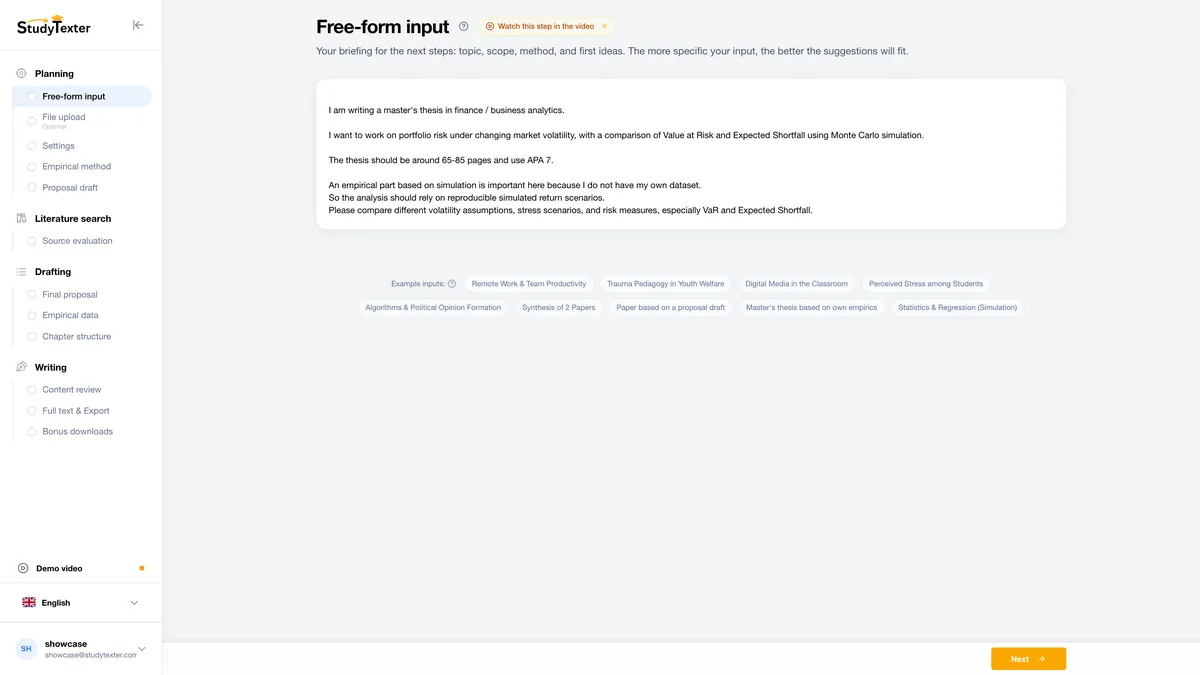
Topic in your words
Describe your topic in your own words. One sentence is enough to start.
Can the AI read the paper? Our open-index check of 500 newly registered papers
Most lists repeat vendor database sizes like “138 million” or “400M+” papers. They do not tell you whether a new paper shows up in the open data behind these tools, and whether there is more than a title in it. We checked this with open data; we did not test the AI tools themselves.
What we did
On Oct 12, 2026 we drew 5 random samples of 100 journal articles each from the Crossref API, the DOI registry that most journal publishers use. Each sample comes from the first week of one month: October 2026, September 2026, July 2026, April 2026 and October 2025[1]. Then we looked up each DOI in the public Semantic Scholar API, without an account and without using any AI feature[2]. Semantic Scholar is the data source of Connected Papers and one of the sources of Elicit, Consensus and ResearchRabbit[12][4][6][10].
| DOI registered at Crossref | Result for 100 random papers |
|---|---|
| Oct 1–7, 2026 (5 to 11 days old) | 98 found · 69 with abstract · 63 open access |
| Sep 1–7, 2026 (about 5 weeks) | 96 found · 54 with abstract · 59 open access |
| Jul 1–7, 2026 (about 3 months) | 95 found · 58 with abstract · 68 open access |
| Apr 1–7, 2026 (about 6 months) | 96 found · 68 with abstract · 62 open access |
| Oct 1–7, 2025 (about 1 year) | 92 found · 62 with abstract · 60 open access |
| All 500 | 477 found (95%) · 311 with abstract (62%) · 312 open access (62%) |
What it means for you
New papers show up fast. Papers registered a week earlier were found as often as papers registered a year ago. Elicit and Consensus say they update weekly, so add up to about a week[4][6].
Missing abstracts matter more. 166 of the 477 papers found had no abstract in the API. For 182 of all 500 papers, Crossref had no abstract either. Elicit says that without full-text access it uses only the paper’s title and abstract[4]. For such a paper, a tool that relies only on this open data has little more than the title to work with. In our sample, 94 of the 477 papers found had neither an abstract in the API nor an open-access PDF link.
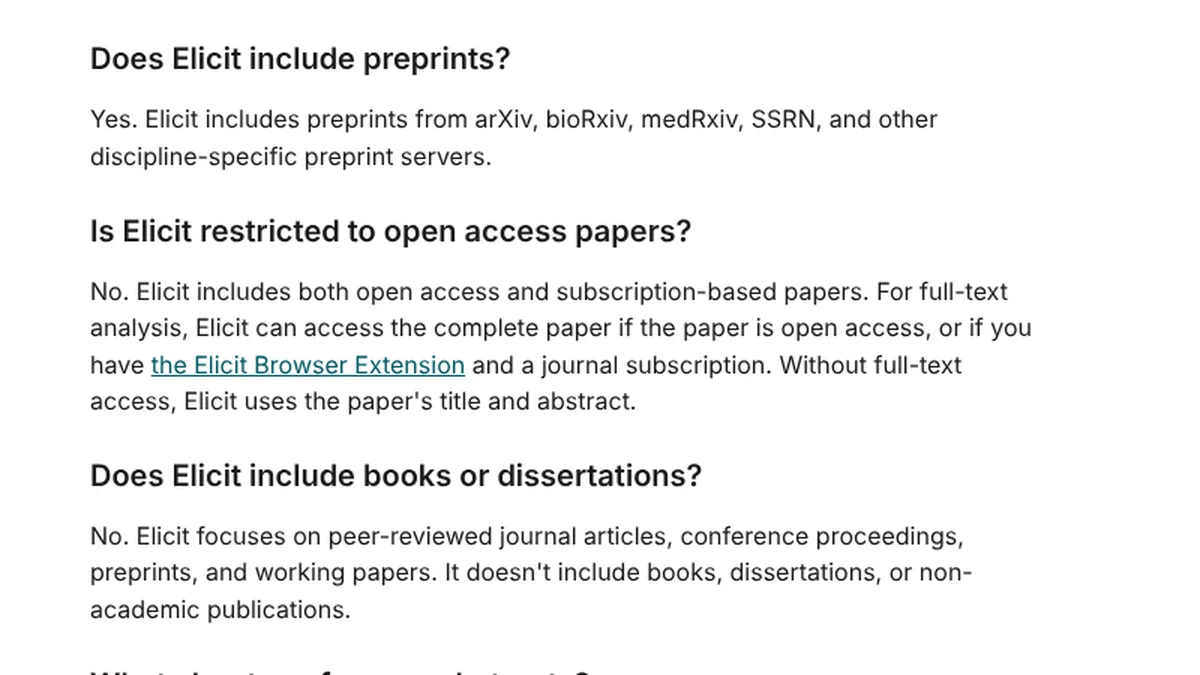
- 1Without full-text access, Elicit uses only the paper’s title and abstract.
- 2No dissertations and no books.
Screenshot of support.elicit.com, Oct 12, 2026, 11:36 UTC, taken by StudyTexter without signing in, cropped.[4]
Limits of this check: we measured only the open Semantic Scholar API, not what each tool reads; the tools also use other sources (for example PubMed, OpenAlex or their own crawl). “Found” means the DOI returned a record in the API; “open access” means Semantic Scholar knows a free PDF link, while the full text may be free elsewhere. The samples are drawn by DOI registration date: 56 of the 500 DOIs belong to articles that Crossref dates at least two calendar years before registration (21 in the September sample); we kept them. Semantic Scholar says its API may leave out an abstract “due to legal reasons” even if the website shows one[2], so the real gap on the website can be smaller. Crossref includes many small journals. OpenAlex was not checked: its free daily limit for our network was used up. Raw data is available on request.
- Sample 20 DOIs from the table above: 10 with an abstract, 10 withoutpending
- Tools Elicit, Consensus, SciSpace, Perplexity and StudyTexter, each searched for the exact titlepending
- Measure is the paper found, and does the summary use more than the title?pending
Pending: this needs the tools themselves, partly with an account.
Step 1: The best AI for finding research papers
Elicit and Consensus answer with AI; Semantic Scholar and Google Scholar are free search engines; Perplexity searches the web. Prices as shown on Oct 12, 2026, in USD.
- What it is
- AI search across more than 138 million papers from Semantic Scholar, PubMed and OpenAlex, with summaries and tables[4]
- Price
- on the “Academic” option: Plus $19 a month, or $11 a month billed yearly ($132); Pro $69, or $39 billed yearly. The “Industry” option shows Pro at $75 or $49[3]
- Free
- Basic: unlimited search and summaries, unlimited chat with papers that have full-text access, limited Research Agent and Reports[3]
- Good for
- literature reviews with many papers; Pro adds a systematic review workflow that can screen 5,000 papers
- Limits
- no books or dissertations; without full-text access it uses only title and abstract[4]. Who may use the Academic prices is not explained on the pricing page
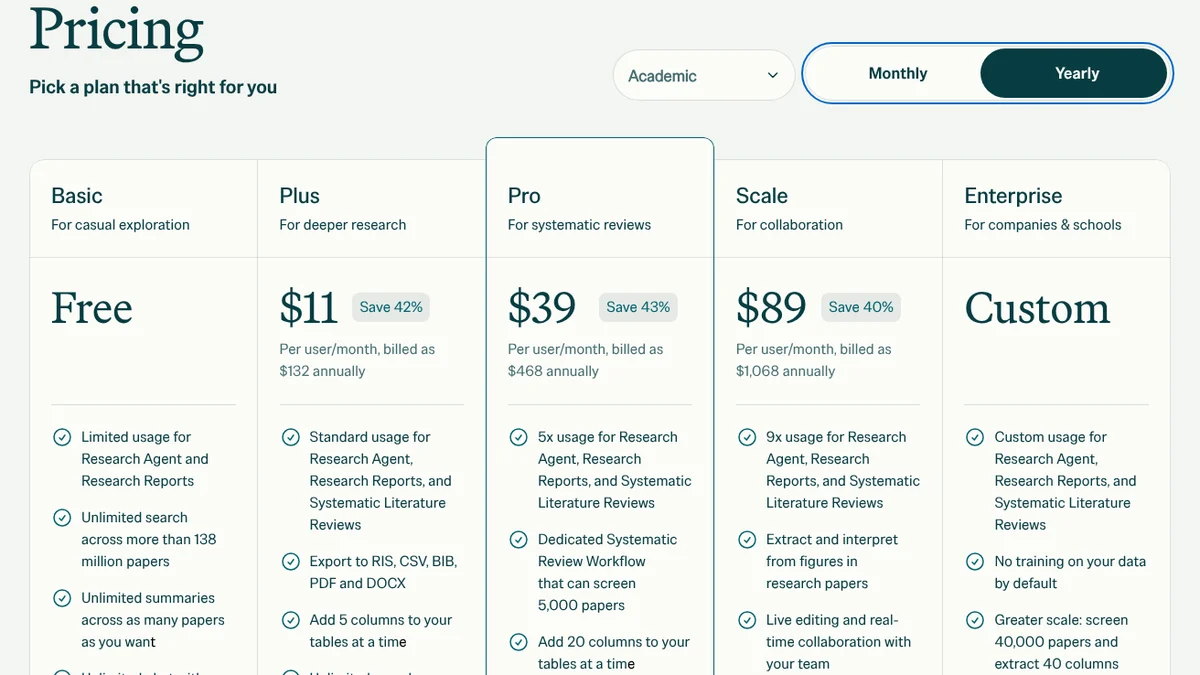
- 1Academic selected in the drop-down; the default is “Industry” with higher prices.
- 2Plus: $11 a month, billed as $132 a year ($19 billed monthly).
Screenshot of elicit.com/pricing, Oct 12, 2026, 11:33 UTC, taken by StudyTexter without signing in, cropped.[3]
- What it is
- an AI search engine that answers questions with cited studies; data from Semantic Scholar, OpenAlex and its own crawl. It gives “400M+” papers on its pricing page and “over 220 million” in its help center[5][6]
- Price
- Pro $20 a month, or $144 a year; Deep $65 a month, or $540 a year; up to 40% off with a valid school email[5]
- Free
- basic paper search, 10 Pro messages and up to 3 Deep reviews a month[5]
- Good for
- a fast check whether studies exist on your question
- Limits
- the free plan has only 10 Pro messages a month; check each cited study yourself
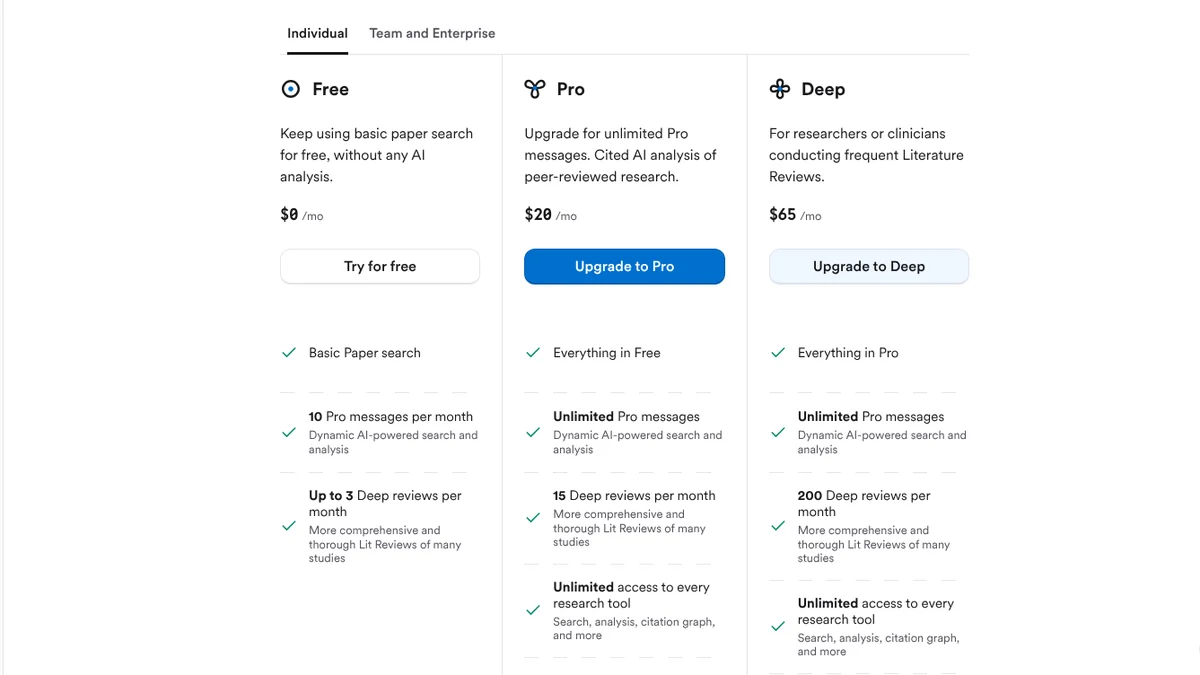
- 110 Pro messages and up to 3 Deep reviews a month for free.
- 2Pro: $20 a month on monthly billing ($144 a year on annual billing; Deep: $65 a month).
Screenshot of consensus.app/pricing, Oct 12, 2026, 11:31 UTC, taken by StudyTexter without signing in, cropped. The student discount banner (up to 40% off) is below this part.[5]
On Consensus, the yearly Pro plan ($144) costs less than the monthly plan once you use it for more than 7 months[5]. Students can compare discount offers in our guide to AI student discounts by country.
- What it is
- a free search engine run by the nonprofit Ai2; over 200 million papers[14], 238,761,312 in the search box on Oct 12, 2026[13]
- Price
- free; an account is optional
- Good for
- free paper search without an account; it is the data source of Connected Papers and one of the sources of Elicit, Consensus and ResearchRabbit[12][4][6][10]
- Limits
- a search engine with result lists; you read and judge the papers yourself
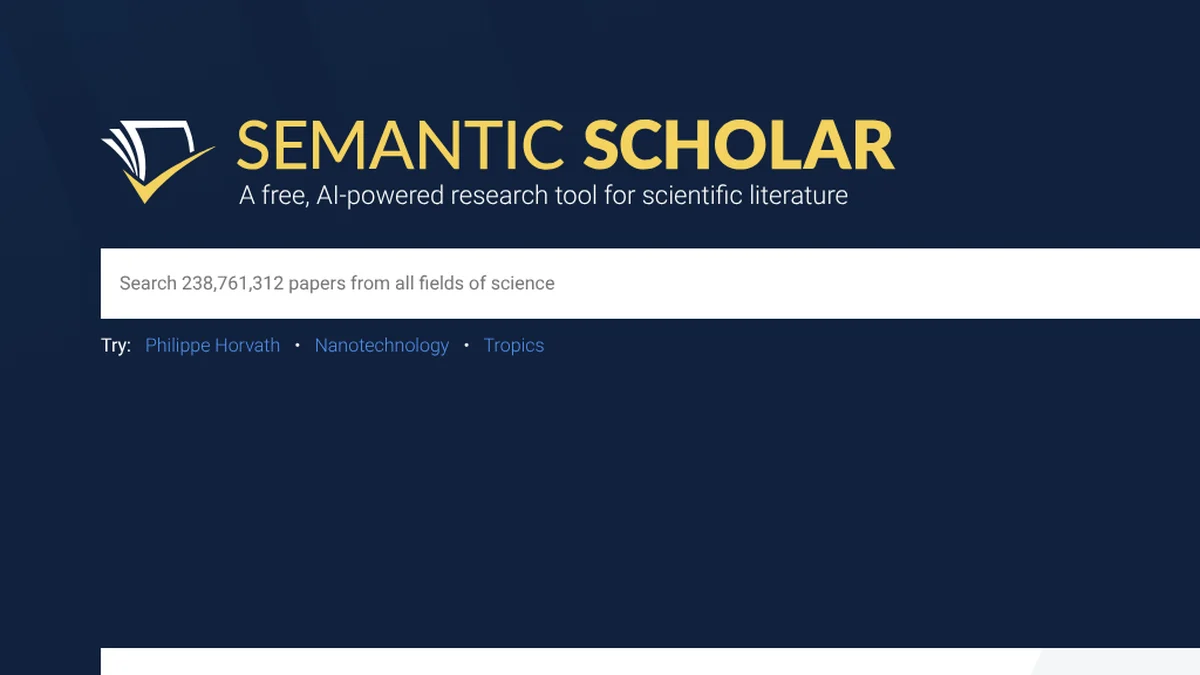
- 1238,761,312 papers in the search box on Oct 12, 2026.
Screenshot of semanticscholar.org, Oct 12, 2026, 11:27 UTC, taken by StudyTexter without signing in, cropped; the cookie notice is outside the crop and was not accepted.[13]
- What it is
- an AI answer engine that cites web pages; the Education Pro plan lists extended access to “Perplexity Academic”
- Price
- Education Pro $10 a month after student or faculty verification with SheerID, which Perplexity calls 50% off[19]; the pricing page was behind a security check for us
- Free
- “practically unlimited basic searches” and a “very limited” number of Pro searches[18]
- Good for
- background and news before you go to academic databases
- Limits
- mixes websites and papers; for your paper, open each source and prefer journals
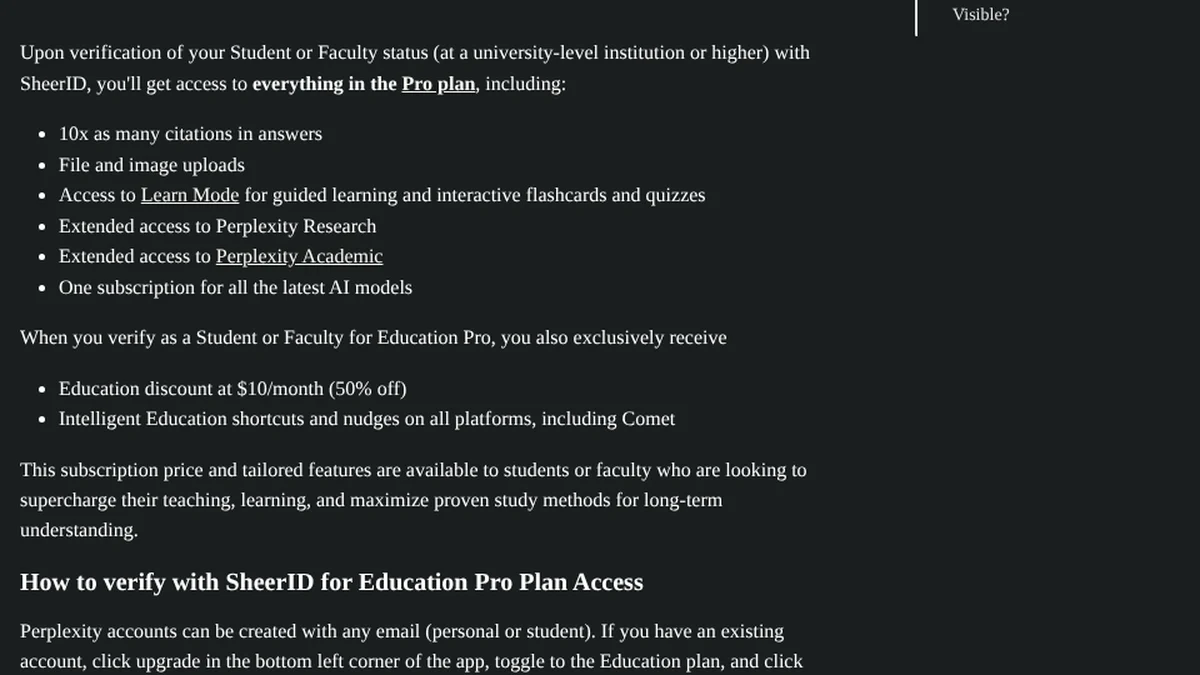
- 1Perplexity Academic: extended access for verified students and faculty.
- 2$10 a month, which Perplexity calls 50% off.
Screenshot of Perplexity’s help center (intercom.help/perplexity-ai), Oct 12, 2026, 11:34 UTC, taken by StudyTexter without signing in, cropped below the author line.[19]
Step 2: The best AI for mapping a research field
You start with papers you already know, and these tools show related papers in a map. They work best once you have a few key papers.
- What it is
- you add “seed” papers, and it suggests connected papers in a visual map; data from Semantic Scholar, Crossref and OpenAlex[10]
- Price
- RR+ $10 a month on the annual plan or $12.50 on the monthly plan; “special country discount codes available”[9]
- Free
- “Forever”: unlimited searches across 310+ million articles, up to 50 seed articles[9]
- Good for
- finding what you missed once you have 3 to 5 key papers
- Limits
- you need good starting papers; summaries are not mentioned on the pricing page
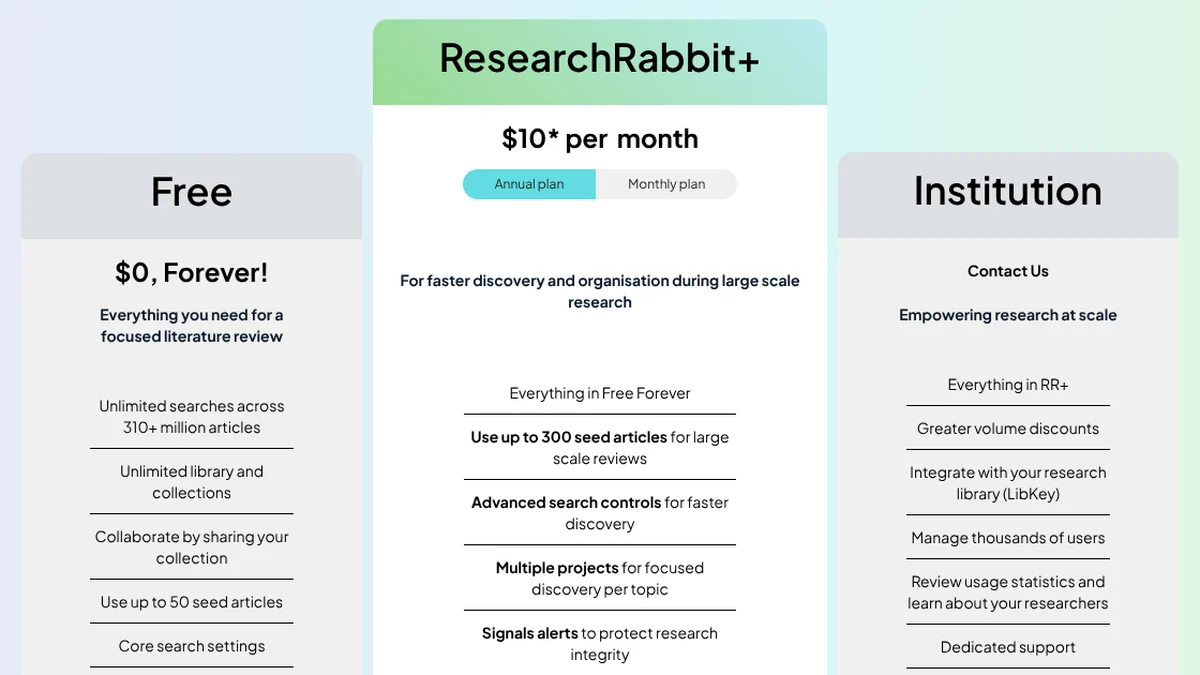
- 1Up to 50 seed articles on the free plan.
- 2RR+: $10 a month on the annual plan ($12.50 on the monthly plan).
Screenshot of researchrabbit.ai/pricing, Oct 12, 2026, 11:31 UTC, taken by StudyTexter without signing in, cookie banner declined, cropped.[9]
- What it is
- builds a graph around one paper; it analyzes about 50,000 papers and shows the few dozen most similar ones (co-citation and bibliographic coupling)[12]
- Price
- Academic USD 6 a month billed yearly (USD 72) or USD 10 a month billed quarterly (USD 30)[11]
- Free
- 5 graphs a month with all features[11]
- Good for
- seeing earlier and later work around one key paper in one view
- Limits
- 5 graphs a month on the free plan; the graph shows similar papers, and Connected Papers says it is not a citation tree, so check citations separately
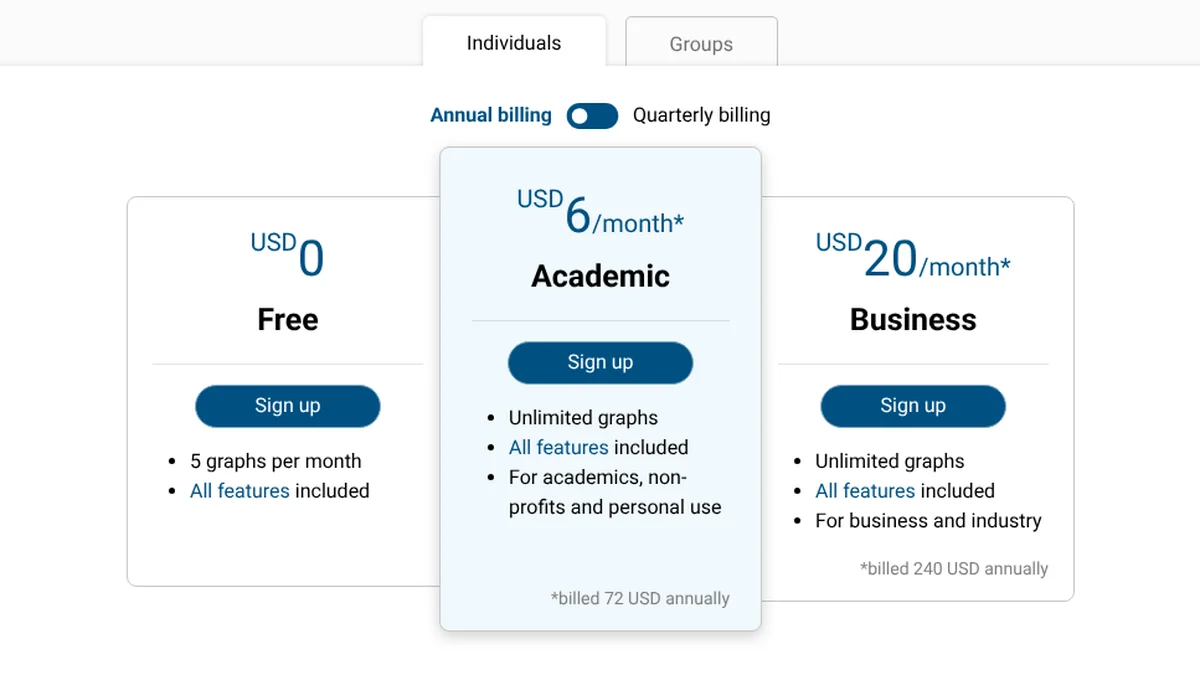
- 15 graphs per month on the free plan.
- 2Academic: USD 6 a month, billed as USD 72 a year.
Screenshot of connectedpapers.com/pricing, Oct 12, 2026, 11:32 UTC, taken by StudyTexter without signing in, cropped.[11]
Step 3: The best AI for reading and summarizing papers
SciSpace and Gemini Notebook help you understand papers you have already chosen. Both work best with the full text: as our check shows, many papers have no free full text, so you may need your library access.
- What it is
- chat with PDFs, literature review, data extraction and a writing editor; 287 million papers[8]
- Price
- Premium $20 a month, or $12 a month billed yearly; Advanced $90 or $70; Max $200 or $160[7]
- Free
- a free version “with a set of limitations”[8]
- Good for
- asking questions about a paper you upload (chat with PDF)
- Limits
- Premium has 1,200 credits a month; the money-back guarantee covers the first 24 hours[7]
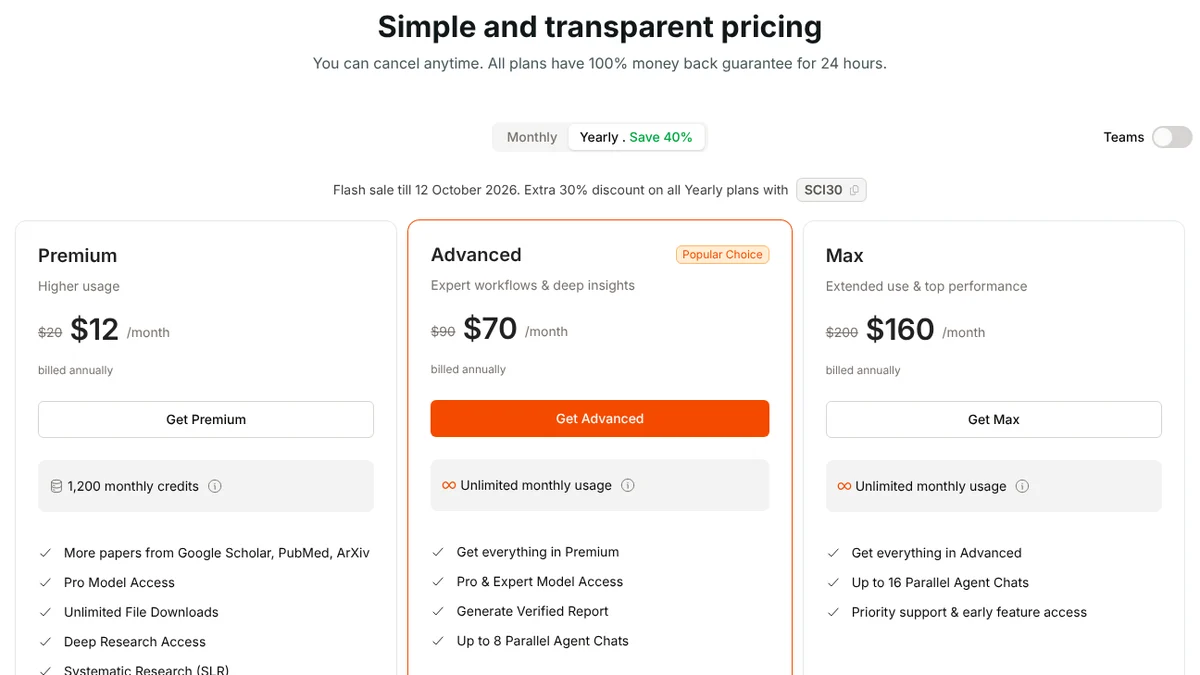
- 1Money-back guarantee for 24 hours on all plans.
- 2Premium: $12 a month in the yearly view shown by default; $20 on monthly billing.
Screenshot of scispace.com/pricing, Oct 12, 2026, 11:26 UTC, taken by StudyTexter without signing in, cropped.[7]
- What it is
- Google’s assistant that answers from the sources you add; NotebookLM became Gemini Notebook in July 2026[16]
- Price
- higher limits with Google AI Plus ($4.99 a month in the US) or Google AI Pro ($19.99)[17]
- Free
- up to 50 sources per notebook; Plus 100, Pro 300, Ultra 600[16]
- Good for
- summarizing and comparing the papers you already chose
- Limits
- not a paper database: the answers are only as good as the sources you add
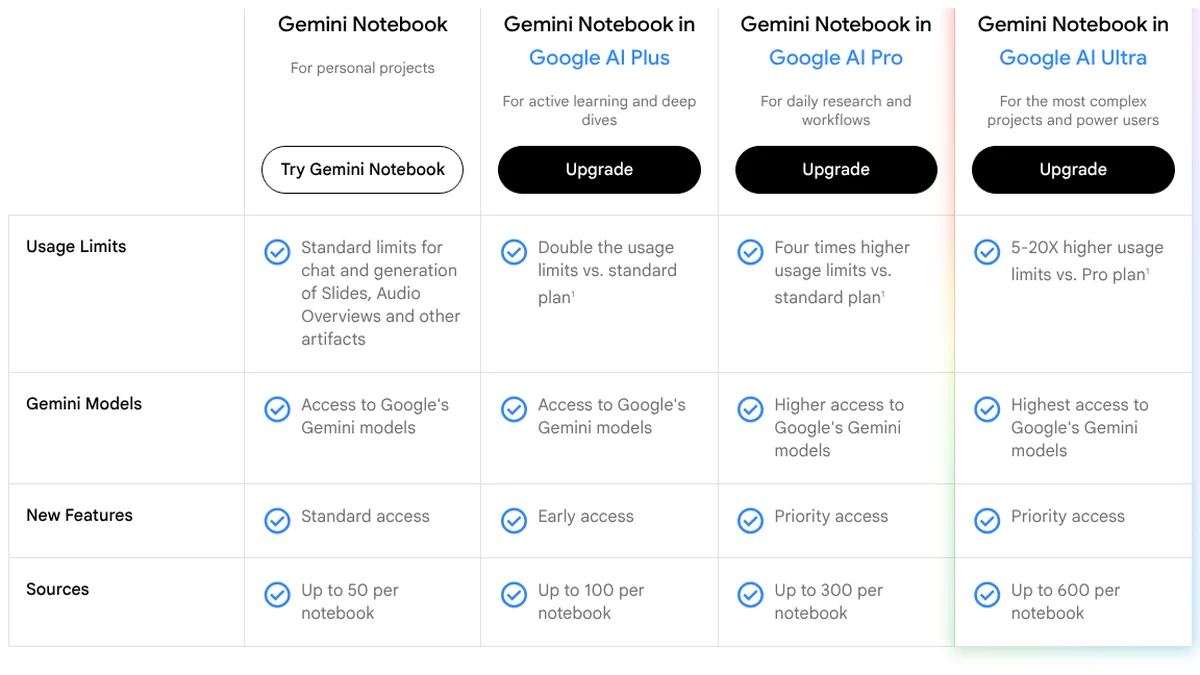
- 1Up to 50 sources per notebook for free.
- 2Google AI Plus: up to 100 sources; Pro 300, Ultra 600.
Screenshot of notebooklm.google/plans, Oct 12, 2026, 11:38 UTC, taken by StudyTexter without signing in, cropped above the cookie notice, which was not accepted.[16]
College students in the US can get Google AI Pro free for one year, according to Google’s subscription page[17]. Our Gemini for students guide lists the offer by country.
Step 4: The best AI for checking the evidence
Before you build an argument on one study, check what later research says about it. Google Scholar’s “Cited by” list is free; Scite sorts the citations for you.
- What it is
- “Smart Citations” show how later research has supported, challenged or discussed a paper; over 1.6 billion citations indexed[21]
- Price
- Basic $20 a month billed yearly; Pro $50 a month billed yearly; 7-day free trial, then you are enrolled in the plan unless you cancel[20]
- Free
- only the 7-day trial
- Good for
- checking a key study before you build your argument on it
- Limits
- student discount only if you recommend Scite to your institution[20]; no screenshot: the site blocked our browser
Decision matrix: which research AI fits your situation?
Find the row that matches your situation.
| Your situation | Use, and why |
|---|---|
| You want a quick answer: is there research on X? | Consensus Free 10 Pro messages a month with cited studies |
| You screen dozens of papers for a review | Elicit Plus or Pro (Academic option) tables across many papers; Pro screens up to 5,000 papers |
| You have a folder of PDFs to understand | Gemini Notebook or SciSpace answers from your own sources |
| You need theses or books | Google Scholar it searches theses and books; Elicit says it excludes them |
| You need to hand in a paper with real sources | StudyTexter draft from your topic, source and page number on every citation |
What a research AI stack costs until you submit
A paper or thesis takes months. Pick up to two paid tools and compare the total with the free stack and a StudyTexter package.
How to combine the tools from week 1 to submission
A plan that spends money only where it helps. Adjust the weeks to your deadline.
- Topic and research questionweek 1Get a free proposal draft in StudyTexter (steps 1 to 5) and ask Consensus Free or Elicit Basic whether studies exist on your question.
- Find the core papersweek 1 to 2Search Elicit, Semantic Scholar and Google Scholar and save the 3 to 5 papers that fit best.
- Fill the gapsweek 2Put these papers into ResearchRabbit or Connected Papers; check one key study in Scite.
- Readweek 2 to 3Summarize your PDFs in Gemini Notebook and check every quote against the original page.
- Draft with sourcesup to 2 hoursIn StudyTexter, accept or reject each suggested source and export the draft, with the source and page number on every citation.
- Revise and submitbefore the deadlineRevise the text as the author and say in your paper which AI tools you used.
Already have your text and want to check it before you submit? See our guide to a Turnitin alternative for students.
Where the specialized tools are better than StudyTexter
Elicit, Consensus and the others are better if …
- you want to search for free, without a limit on searches
- you screen many papers in a table for a systematic review (Elicit)
- you want a visual map of a field (ResearchRabbit, Connected Papers)
StudyTexter is better if …
- your goal is the paper itself, from topic to draft
- you need the source and page number on every citation
- you prefer one payment over a monthly subscription
FAQ: best AI for research
What is the best free AI for research papers?
Elicit Basic: unlimited search across more than 138 million papers and unlimited summaries. Consensus Free: 10 Pro messages a month. Semantic Scholar and Google Scholar are free. ResearchRabbit is free “forever” for up to 50 seed articles.
Is there an AI that summarizes research papers?
Yes. Elicit, Consensus and SciSpace summarize papers, and Gemini Notebook summarizes the PDFs you upload. Elicit says that without full-text access it uses only the title and abstract. In our check, 166 of 477 recently registered papers that Semantic Scholar found (35%) had no abstract in its open API. So always open the paper before you cite it.
Which AI is best for a literature review?
Elicit, for searching and screening many papers (its Pro plan can screen up to 5,000). Then ResearchRabbit or Connected Papers to find what you missed.
Can I use ChatGPT for research papers?
A general chatbot can help you understand a topic, but it can return references that do not exist. Tools built on academic databases, like Elicit, Consensus or Semantic Scholar, link to real papers. In every case, open the paper and find the exact page before you cite it.
Is it allowed to use AI for research in college?
Rules depend on your college and often your instructor. Check your syllabus or ask your advisor, and say in your paper which tools you used. You are the author and responsible for every source.
How we tested and what we did not test

We read websites, terms and reviews ourselves, back every number with a source and access date, and only add test results once we have them. Found a mistake? We correct it with a date.
On Oct 12, 2026 we read the pricing, help and about pages of 11 tools and took dated screenshots without signing in. We did not create accounts or ask any AI tool a question.
We accessed the sites from the US, so prices are in USD as displayed. Prices change often: check them before you pay. Scite and the Perplexity pricing page blocked our browser; we used the page text (Scite) and the help center (Perplexity).
StudyTexter sells an AI assistant for academic papers, so we have an interest in this topic. That is why every number has a source and a date, and why we say where the other tools are better. Brand names belong to their owners. Found a mistake? We correct it and add the date.
Changes: Oct 12, 2026, first version.
Sources
- Crossref REST API: random samples of journal articles by DOI registration date5 samples of 100, drawn Oct 12, 2026, 11:12 UTC · accessed Oct 12, 2026
- Semantic Scholar Academic Graph API: paper/batch lookup by DOI, no account477 of 500 found · accessed Oct 12, 2026
- elicit.com/pricing, Industry and Academic, Monthly and YearlyBasic free · accessed Oct 12, 2026
- Elicit Help Center: Elicit’s source for papers138 million papers, updated weekly, title and abstract without full text, no dissertations · accessed Oct 12, 2026
- consensus.app/pricing, Monthly and AnnualFree $0, Pro $20/month or $144/year, Deep $65/month or $540/year, up to 40% off for students · accessed Oct 12, 2026
- Consensus Help Center: How Consensus works (Sep 10, 2026)over 220 million papers · accessed Oct 12, 2026
- scispace.com/pricing, Monthly and YearlyPremium $20/month or $12/month yearly, 1,200 credits, 24-hour money-back · accessed Oct 12, 2026
- SciSpace: Literature Review page and FAQ287 million papers · accessed Oct 12, 2026
- researchrabbit.ai/pricing, annual and monthly planFree $0 forever, 310+ million articles, 50 seed articles · accessed Oct 12, 2026
- ResearchRabbit Help: Welcome to the new ResearchRabbitdata from Semantic Scholar, Crossref and OpenAlex · accessed Oct 12, 2026
- connectedpapers.com/pricing, annual and quarterly billing5 graphs a month free · accessed Oct 12, 2026
- Connected Papers: Aboutabout 50,000 papers analyzed per graph, Semantic Scholar Paper Corpus · accessed Oct 12, 2026
- semanticscholar.org, home page search box“Search 238,761,312 papers from all fields of science” · accessed Oct 12, 2026
- Semantic Scholar: Aboutover 200 million papers, run by the nonprofit Ai2 · accessed Oct 12, 2026
- Google Scholar: Aboutarticles, theses, books, abstracts and court opinions · accessed Oct 12, 2026
- Gemini Notebook: Plans and FAQrenamed from NotebookLM in July 2026 · accessed Oct 12, 2026
- gemini.google: Subscriptions, United StatesGoogle AI Plus $4.99/month, Google AI Pro $19.99/month · accessed Oct 12, 2026
- Perplexity Help Center: Which Perplexity subscription plan is right for you?Free plan limits · accessed Oct 12, 2026
- Perplexity Help Center: What is Education Pro?“Education discount at $10/month (50% off)” · accessed Oct 12, 2026
- scite.ai/pricingBasic $20/month billed yearly, Pro $50/month billed yearly, 7-day trial · accessed Oct 12, 2026
- scite.ai, home pageSmart Citations · accessed Oct 12, 2026
Read next
Brands and logos mentioned belong to their owners and are used for identification only. They are not affiliated with StudyTexter.