
Best AI tools for students: the right pick for every study task
Many lists rank 13 to 23 apps in one long list. On October 12, 2026 we opened the public pricing pages of 10 tools, took 8 dated screenshots, and sorted them, plus our own StudyTexter, by the job each one does best. Then we built a calculator that shows which free tiers cover your semester.

 Janosch & Dr. Jonathan SchulteStudyTexter editorial team
Updated
17 min read
Janosch & Dr. Jonathan SchulteStudyTexter editorial team
Updated
17 min readDisclosure: This comparison is published by StudyTexter, a company in the same market. We only state verifiable facts with source and date. Method
Contents
The best AI tools for students depend on the task. To learn and get explanations: ChatGPT, Gemini or Claude (all with free plans). For lecture notes: Otter.ai. To study your own PDFs: Gemini Notebook (formerly NotebookLM). To find papers: Elicit or Perplexity. To proofread, cite and plan: Grammarly, Zotero, Notion. For a research paper or thesis, StudyTexter is our number 1: real sources from 479M+, a page number for every quote, plagiarism and AI check included, free up to the proposal draft, then a one-time payment from $79.
Best AI tools for students: a guide by study task
In the UK, almost all students already use AI. In a 2026 survey of 1,054 UK undergraduates, 95% used AI in some form and 94% used it to support assessed work[2]. So the real question is which tool fits which job. A chatbot can explain a theory in three paragraphs. For the reference list of your paper it is risky: in a study of the free versions of eight chatbots (tested in 2025; the models have changed since), only 26.5% of 400 references were fully correct and 39.8% were wrong or fabricated[1].
This guide sorts tools by the task you have this week:
- StudyTexter: research papers and theses (#1)
- ChatGPT, Gemini, Claude: learning and explanations
- Otter.ai: lectures and notes
- Gemini Notebook: reading your PDFs
- Elicit, Perplexity: research
- Grammarly: writing and revising
- Zotero: citing
- Notion: planning
#1 for research papers and theses: StudyTexter
1. StudyTexter for research papers and theses
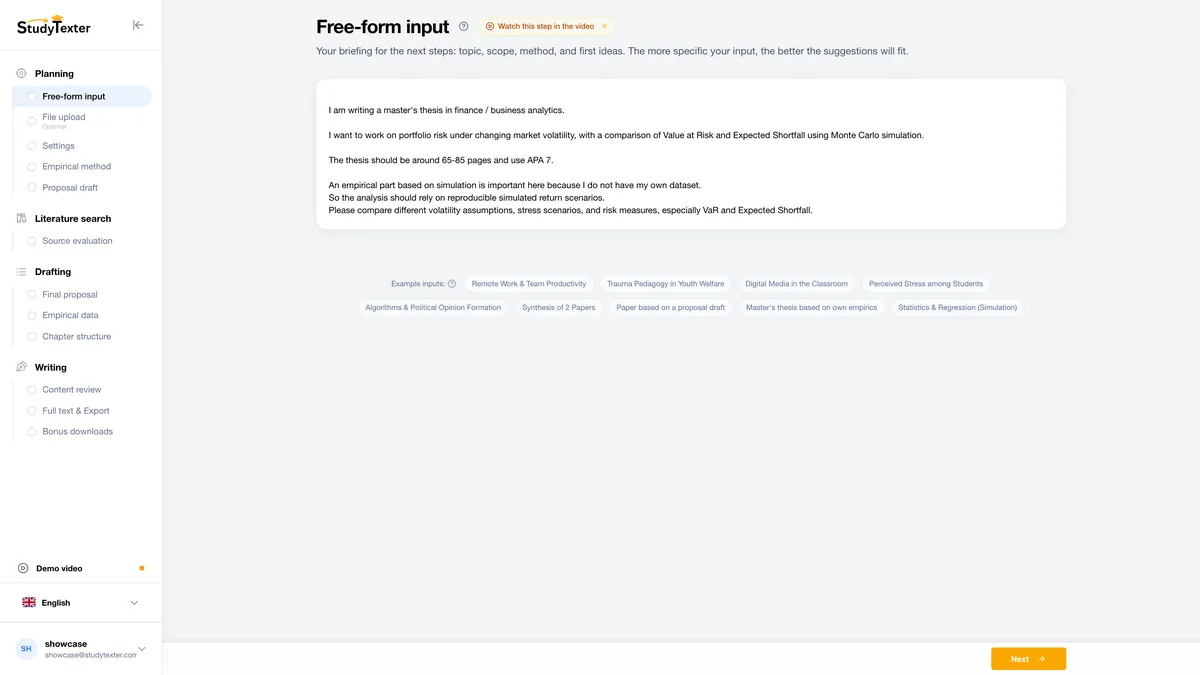
StudyTexter guides you step by step from your topic to a draft of your paper, with sources you choose yourself. General chatbots are weakest at exactly this: real sources and quotes you can check.
Why it is #1 for your paper
- source check across 479M+ sources: you accept or reject every suggested source
- every quote shows its source and page number in the Evidence View
- over 2,800 citation styles, chosen in step 3 (free)
- plagiarism and AI check included; export to Word, PDF, LaTeX or Google Docs
- draft in up to 2 hours; you stay the author and revise it
Honest limits
- not a general chatbot: for explanations, flashcards or lecture notes use the other tools in this list
- free only for steps 1 to 5, up to the proposal draft; the source check (step 6) and everything after it needs a package
- packages by length, one-time payment: $79 (20 pages), $99 (40), $139 (80), $179 (120 pages)
- eKomi 4.8 / 5 from 822 reviews; one platform, not an independent test
Paraphrase of the passage: with adaptive weights, the lasso satisfies the oracle properties.
When your advisor asks where a claim comes from, you open the source at the right page.
Learning and explanations: ChatGPT, Gemini, Claude
These three answer questions, explain concepts in simpler words and quiz you. Their free plans are enough for everyday studying.
2. ChatGPT explanations, study mode
- Price as stated
- Free plan; Plus $20 a month, billed monthly[5]; Go adds higher limits on top of Free, its price is only on the pricing page[6]
- Study mode
- “available across ChatGPT plans globally”; it adds no extra messages, and OpenAI says it “can make mistakes”[7]
- Students
- US only: 4 free monthly billing periods of Plus for students at eligible U.S. degree-granting institutions; claim by Oct 31, 2026 (as of Oct 12), then $20 a month[8]
- Good for
- explaining a concept step by step, practice questions, checking your own understanding
- Limits for coursework
- do not ask it for a reference list: in a 2025 study (free versions at the time), 39.8% of chatbot references were wrong or fabricated[1]
3. Gemini explanations, Google apps, US student year
- Price as shown (US)
- Free $0; Google AI Plus $4.99; Google AI Pro $19.99; Ultra from $99.99 per month[3]
- Free tier
- Gemini app with Deep Research, Canvas, Gemini Live and Gemini Notebook[3]
- Students (US)
- eligible U.S. college students aged 18+: Google AI Pro free for 1 year; redeem until Dec 31, 2026; valid form of payment required; then $19.99 a month unless you cancel[4]
- Good for
- explanations, Deep Research on a topic; Gemini in Gmail with Google AI Plus, in Gmail and Docs with Google AI Pro
- Limits for coursework
- check every reference in the original; outside the US, check the offer for your country (see our student discount guide)
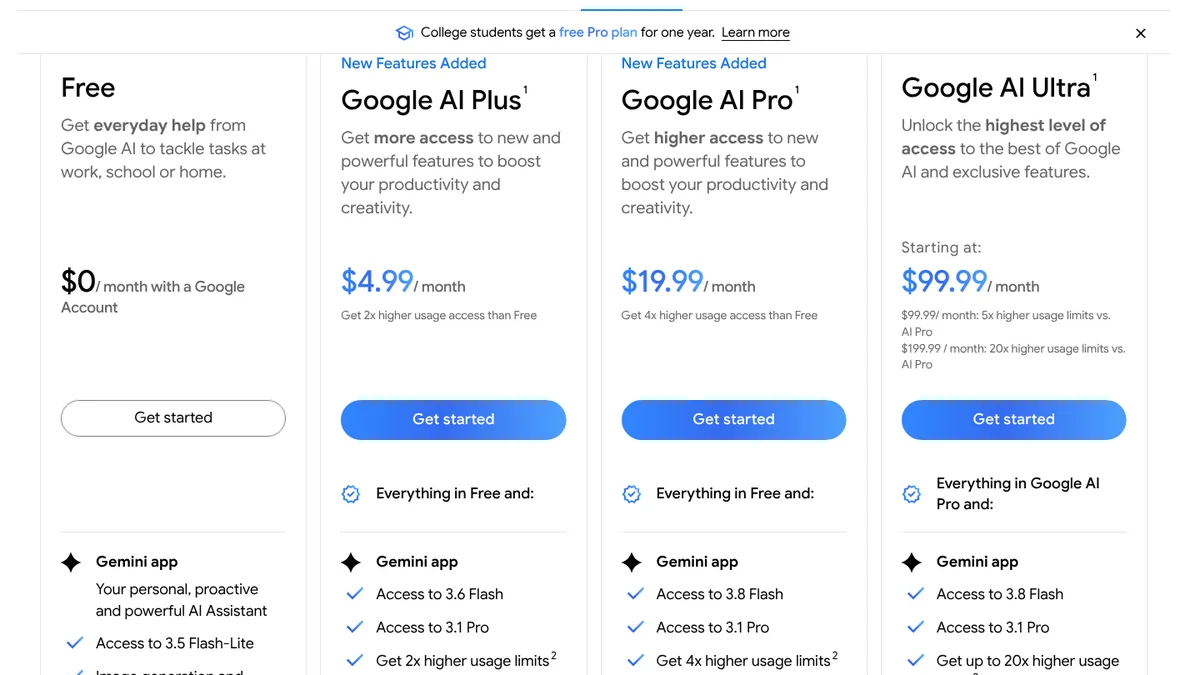
- 1Banner: “College students get a free Pro plan for one year.”
- 2Free: $0 a month with a Google Account.
- 3Google AI Plus: $4.99 a month.
- 4Google AI Pro: $19.99 a month.
Screenshot of gemini.google/subscriptions (United States), Oct 12, 2026, 11:18 UTC, taken by StudyTexter without signing in; Google's cookie notice hidden.
Who gets Google's free student year in which country: Gemini for students. All current student offers by country: AI student discounts.
4. Claude feedback, long texts, slides
- Price as shown
- Free $0; Pro $17 a month with annual billing ($200 up front) or $20 billed monthly; Max from $100; tax not included[9]
- Free tier
- chat, web search, file creation, up to 5 projects, Claude Design, Slides and Docs; Research only from Pro[9]
- Students
- the individual pricing page does not mention a student discount[9]
- Good for
- feedback on your own paragraphs, structuring long notes, a first slide deck (Claude Slides is in the free plan)
- Limits for coursework
- in the 2025 study (free versions at the time), among the chatbots with the highest rate of false references[1]
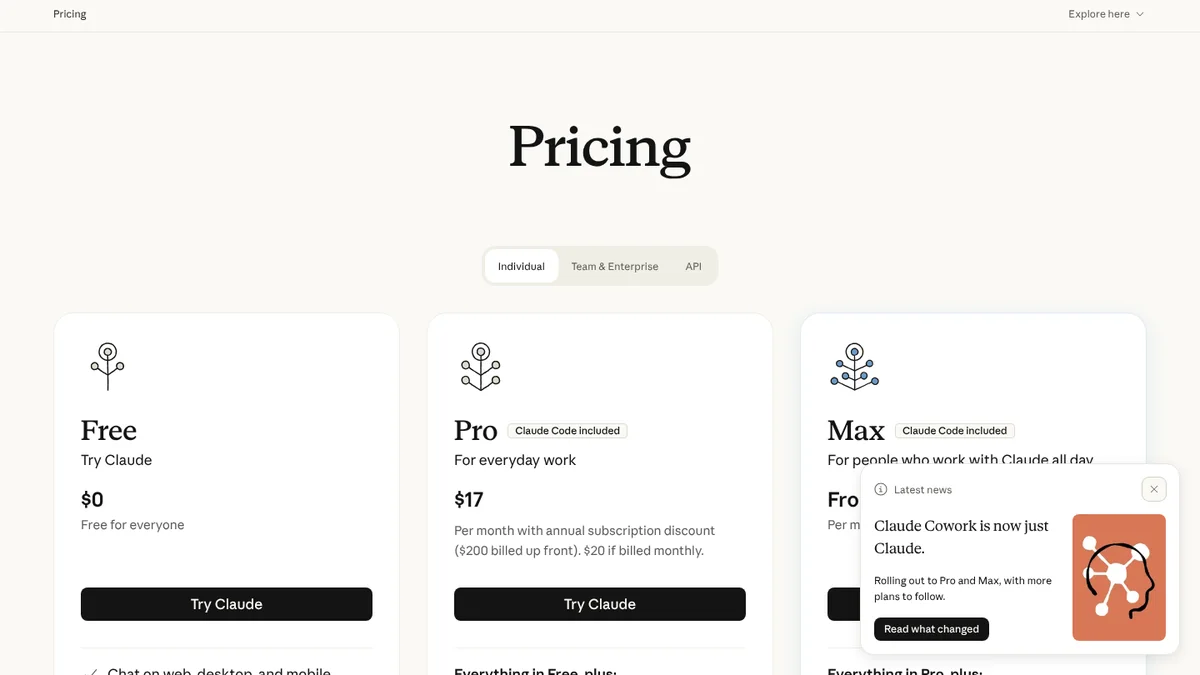
- 1Free: $0.
- 2Pro: $17 a month with annual billing.
- 3$200 billed up front, $20 if billed monthly.
Screenshot of claude.com/pricing, Oct 12, 2026, 11:14 UTC, taken by StudyTexter without signing in.
Notes and lectures: Otter.ai
Otter turns speech into a searchable transcript with a summary. The free plan has one limit that most lists we checked do not mention:
5. Otter.ai lecture transcripts
- Price as shown
- Basic free; Pro $16.99 a month billed monthly or $8.33 a month billed annually[10]
- Free tier
- 300 transcription minutes a month, at most 30 minutes per conversation, 3 file imports in total, 25 most recent conversations[10]
- Students
- 20% off Pro with a .edu email: $13.59 monthly or $6.67 a month billed $79.99 a year[10]
- Good for
- searchable transcripts and summaries of lectures and group meetings
- Limits for coursework
- a 75-minute lecture does not fit into one free recording; ask your instructor before you record a class
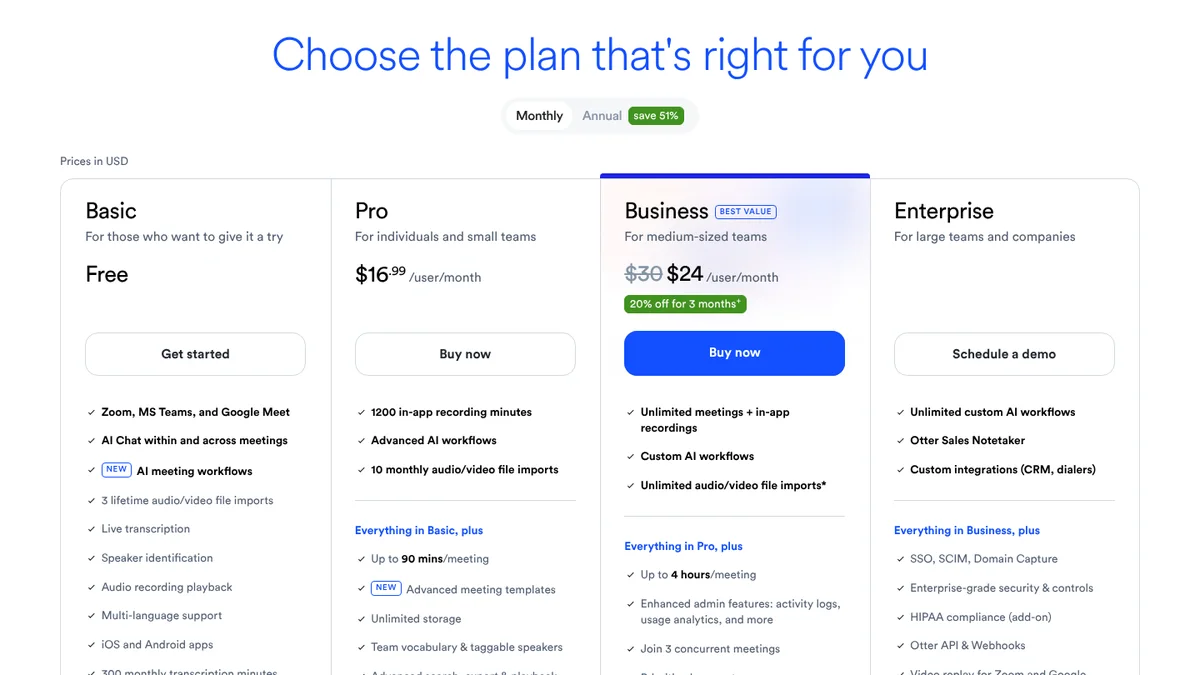
- 1Monthly billing selected.
- 2Basic: free (300 minutes a month, 30 minutes per conversation further down).
- 3Pro: $16.99 a month, billed monthly.
Screenshot of otter.ai/pricing, Oct 12, 2026, 11:14 UTC, taken by StudyTexter without signing in, view “Monthly”.
Reading PDFs: Gemini Notebook (formerly NotebookLM)
Upload your slides, readings and notes, then ask questions, listen to an Audio Overview or make flashcards. The answers come from your own sources.
6. Gemini Notebook (formerly NotebookLM) study your own PDFs
- Price
- free; more with Google AI Plus, Pro or Ultra (US: from $4.99 a month)[11][3]
- Free tier
- up to 50 sources per notebook, standard limits for chat, Slides and Audio Overviews; 100 / 300 / 600 sources with Plus / Pro / Ultra[11]
- Privacy
- for individuals, data is not used for training unless you share feedback[11]
- Good for
- questions about your own class materials, Audio Overviews to listen to, flashcards before an exam[11]
- Limits for coursework
- answers are only as good as the sources you upload; check quotes in the original PDF
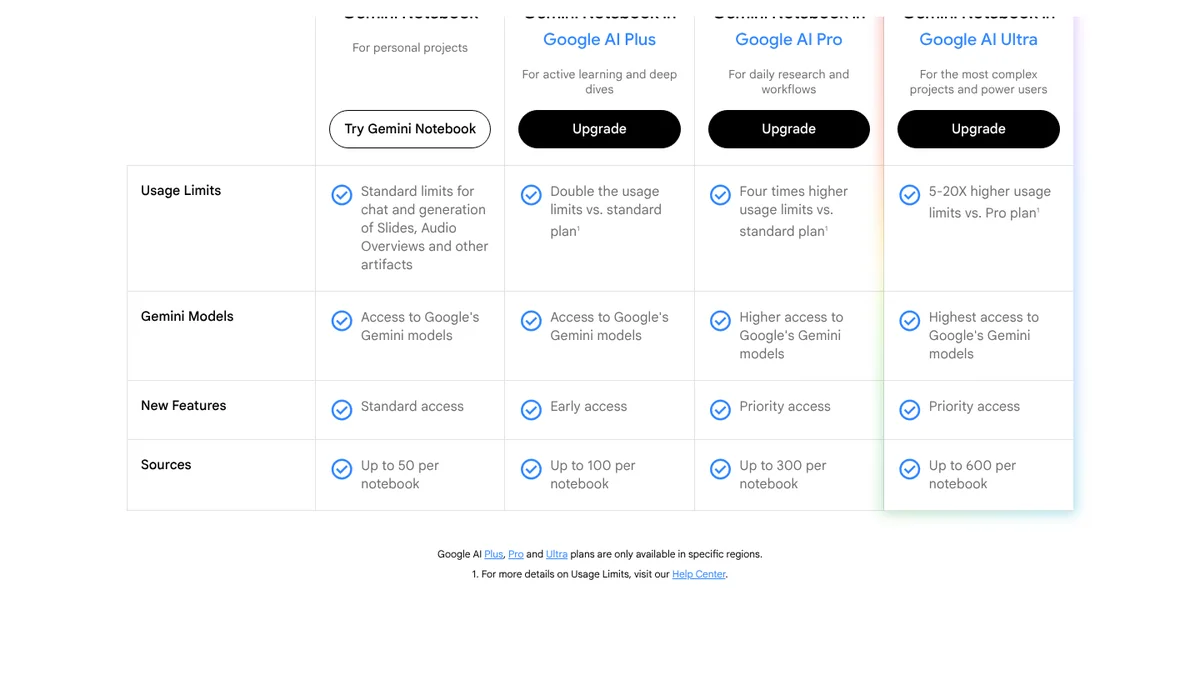
- 1Free: standard limits for chat, Slides and Audio Overviews.
- 2Free: up to 50 sources per notebook.
- 3Google AI Plus: up to 100 sources.
- 4Paid plans only in specific regions.
Screenshot of notebook.google/plans, Oct 12, 2026, 11:19 UTC, taken by StudyTexter without signing in; Google's cookie notice hidden.
Research: Elicit and Perplexity
When you need literature, do not ask a chatbot for a list. Use tools that search research papers or show the pages they used, and open every source yourself. Elicit searches research papers, Perplexity searches the web.
7. Elicit find and compare research papers
- Price as shown
- Basic free; Pro $75 per month billed monthly, or $49 a month billed $588 a year[12]
- Free tier
- unlimited search across more than 138 million papers, unlimited summaries, chat with full-text papers, import from Zotero; limited Research Agent and Reports[12]
- Good for
- finding studies and comparing their results in a table
- Limits for coursework
- Elicit labels Pro “For systematic reviews”; at $49 to $75 a month it is a lot for a single class paper. Open every paper before you cite it
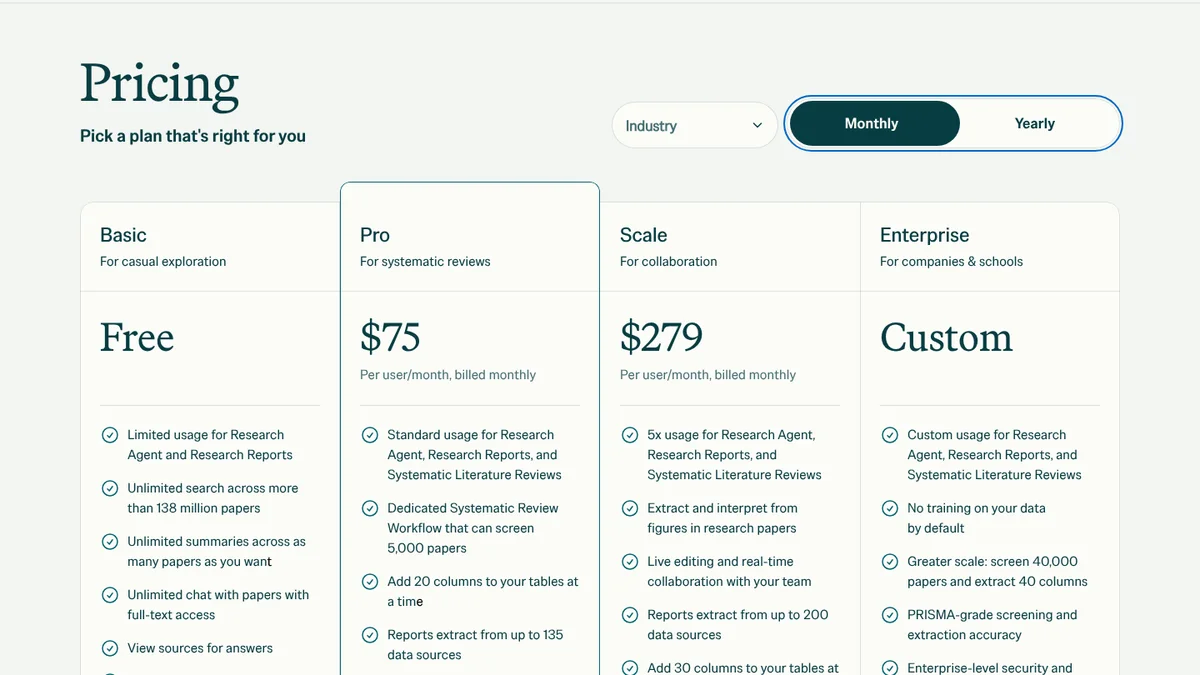
- 1Monthly billing selected.
- 2Basic: free.
- 3Pro: $75 per user and month, billed monthly.
- 4Free: unlimited search across more than 138 million papers.
Screenshot of elicit.com/pricing, Oct 12, 2026, 11:17 UTC, taken by StudyTexter without signing in, view “Monthly”.
8. Perplexity quick web answers with links
- Price
- Free plan; Education Pro $10 a month with SheerID verification[13]; Pro price not captured (security check on perplexity.ai, no screenshot)
- Free tier
- “practically unlimited” basic searches, 3 Pro Searches a day, 1 Research query a month, limited file uploads[13]
- Good for
- a fast overview of a current topic with links you can open
- Limits for coursework
- web pages are not peer-reviewed literature; in the 2025 study (free versions at the time) Perplexity was among the chatbots with the most false references[1]
Writing and revising: Grammarly
The paper itself is covered by StudyTexter above. For the final pass over your own sentences, Grammarly is a common choice (the company says it is trusted by over 40 million people).
9. Grammarly proofreading and clarity
- Price as shown
- Free $0; Pro shown as a struck-through $12 USD next to “Try for free” and a 7-day free trial ($0 payment today); no billing period next to it. Plan data in the page source: $30 monthly, $60 quarterly, $144 a year ($144 ÷ 12 = $12; the page does not say so)[14]
- Free tier
- spelling and grammar, tone, 100 AI prompts a month[14]
- Pro adds
- full-sentence rewrites, plagiarism and AI text detection, 2,000 AI prompts a month[14]
- Limits for coursework
- it improves text you wrote; it does not find or check sources
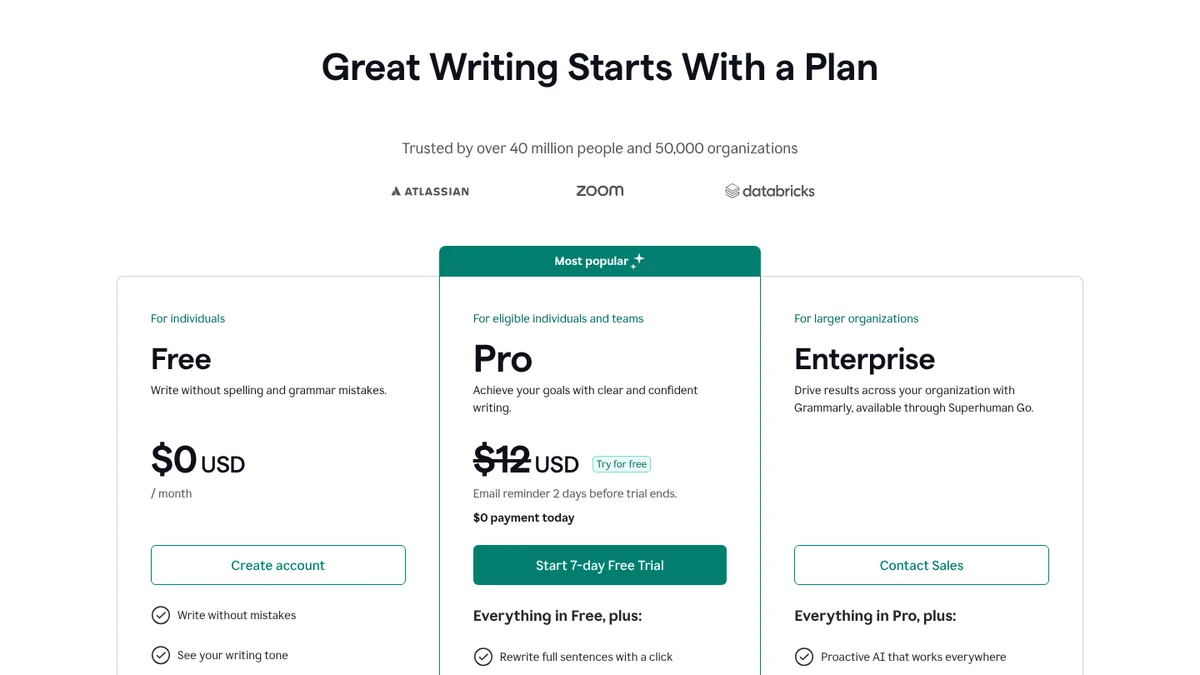
- 1Free: $0 a month.
- 2Pro: $12 USD, struck through, no billing period next to it.
- 3Pro starts with a 7-day free trial.
Screenshot of grammarly.com/plans, Oct 12, 2026, 11:13 UTC, taken by StudyTexter without signing in.
Citing: Zotero
Zotero itself is not an AI tool. It is here because every AI workflow needs one place for the sources you have actually checked.
10. Zotero citations and reference list (not AI)
- What it is
- “a free, easy-to-use tool” to collect, organize, cite and share research; over 9,000 citation styles; works in Word, Google Docs and LibreOffice[15]
- Price as shown
- software free; storage 300 MB free, 2 GB $20 a year, 6 GB $60 a year, unlimited $120 a year[16]
- Good for
- one library for every source, citations in your text, a clean bibliography
- Why it is in an AI list
- AI tools give you references; Zotero is where you store the ones you have checked. Elicit can import from it
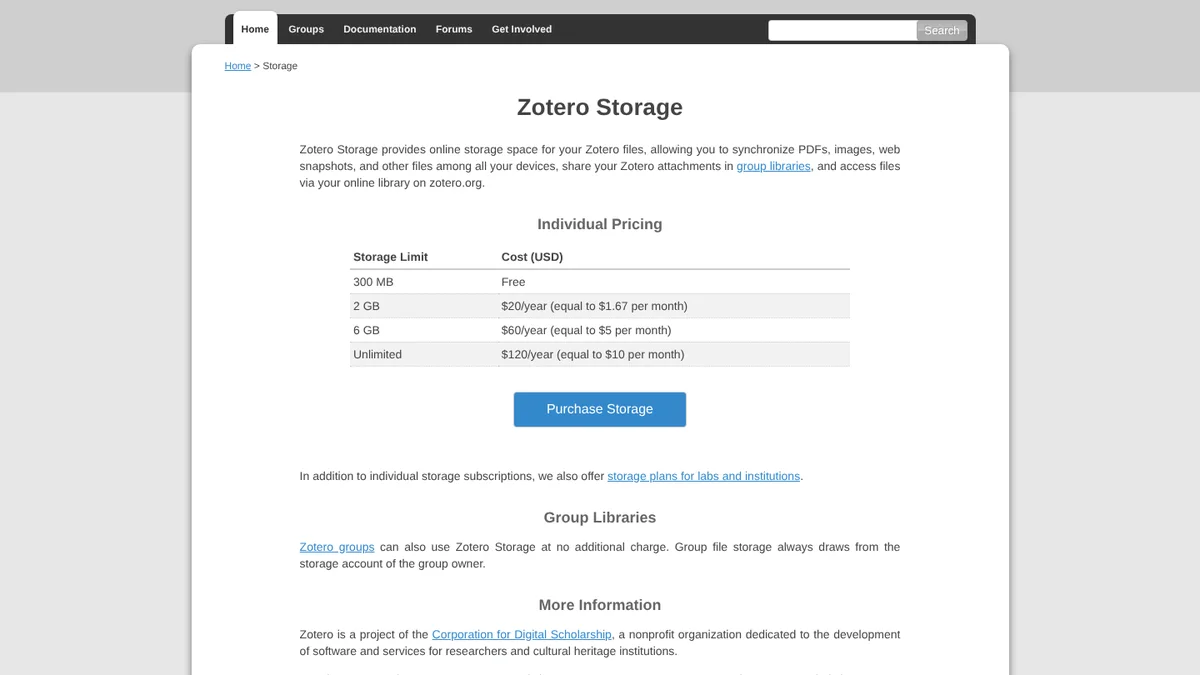
- 1300 MB: free.
- 22 GB: $20 a year.
- 3Unlimited: $120 a year.
Screenshot of zotero.org/storage, Oct 12, 2026, 11:14 UTC, taken by StudyTexter without signing in.
Planning: Notion
11. Notion semester planner and notes
- Price as shown
- Free $0 with a trial of Notion AI; Plus $10; Business $20 per member and month (view “Pay yearly”); Business adds Notion Agent and AI Meeting Notes[17]
- Students
- free Education Plan for students at an accredited college or university with a school email; no set end date, verify once a year[18]
- Good for
- deadlines, reading lists, group projects
- Limits for coursework
- the Education Plan FAQ does not mention Notion AI[18]; on Free, AI is a trial
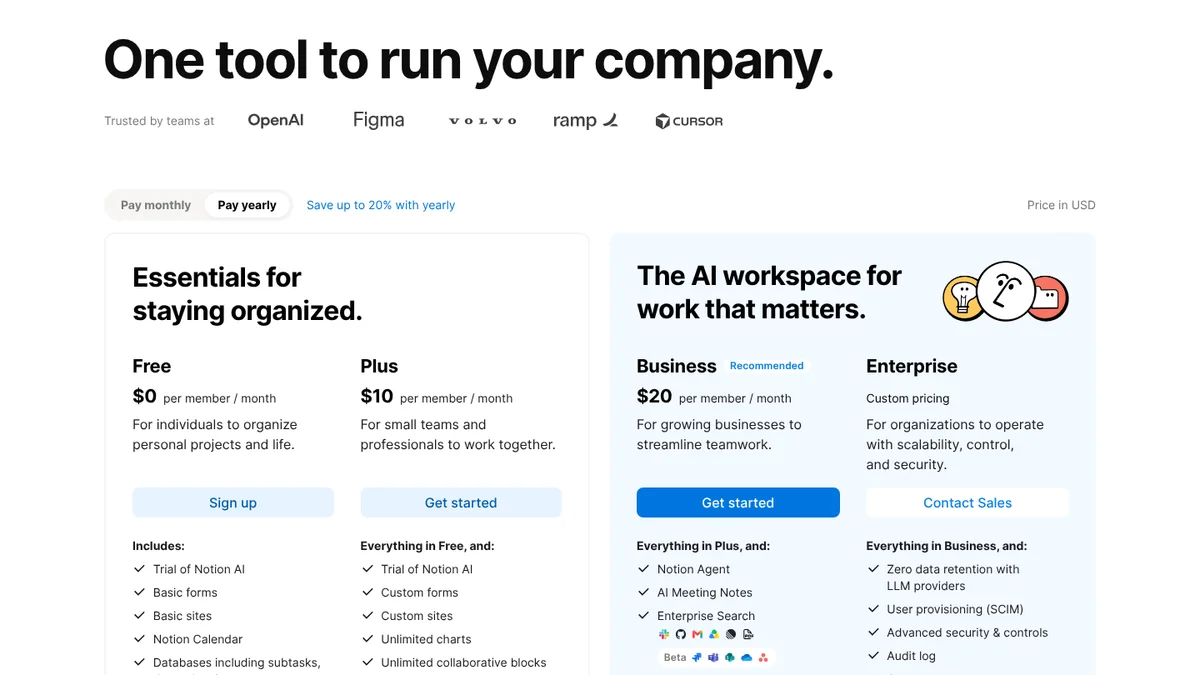
- 1“Pay yearly” is selected by default.
- 2Free: $0 per member and month.
- 3Free includes a trial of Notion AI.
Screenshot of notion.com/pricing, Oct 12, 2026, 11:14 UTC, taken by StudyTexter without signing in.
Task matrix: which AI tool for which study task
The whole list on one screen, with the question that decides your budget: is the free tier enough?
| Study task | Our pick |
|---|---|
| Understand a topic | ChatGPT, Gemini or Claude Free enough: yes, for most students |
| Lecture notes | Otter.ai Free enough: only for short sessions (30 minutes per recording, 300 minutes a month) |
| Read and review your PDFs | Gemini Notebook Free enough: yes, up to 50 sources per notebook |
| Find research papers | Elicit Free enough: yes, unlimited search in 138M+ papers |
| Quick web overview | Perplexity Free enough: yes; 1 Research query a month |
| Proofread | Grammarly Free enough: yes for spelling and grammar; 100 AI prompts a month |
| Cite and build a bibliography | Zotero Free enough: yes; 300 MB file storage |
| Slides | Claude or Gemini Notebook Free enough: yes; Claude Slides and Gemini Notebook Slides are in the free plans |
| Plan the semester | Notion Free enough: yes; Education Plan free with school email |
| Research paper or thesis | StudyTexter Free enough: up to the proposal draft; then $79 once (20 pages) |
Which free tiers cover your semester?
Many students can stay on free plans. Enter how you study, and the calculator checks your usage against each free tier. Only where you go over a published limit does it add the paid plan for the months of your semester:
An honest reading: most tools stay free; the exceptions are long lectures in Otter, extra Perplexity research and heavy Grammarly use. For a paper, StudyTexter is free up to the proposal draft, and the source check needs a package.
Semester plan: week 1 to submission
A plan for a 15-week semester with one research paper. For a thesis, stretch the middle phases; the order stays the same.
- Set upWeek 1Read the AI policy in every syllabus. Set up Notion for deadlines and install Zotero. Ask whether you may record lectures.
- LecturesWeek 1 to 14Record with Otter (check the free-plan limit first). Every week, load slides and notes into Gemini Notebook and make flashcards.
- Topic and proposalWeek 3 to 4Brainstorm with a chatbot. In StudyTexter, enter your topic and choose from over 2,800 citation styles in step 3 (free); step 5 gives you the proposal draft for free. Discuss it with your advisor.
- SourcesWeek 5 to 7With a package, run the source check in StudyTexter and pick each source with yes or no. Add studies from Elicit. Save every source you checked in Zotero.
- DraftWeek 8 to 11Build the chapter structure and the draft in StudyTexter, with a page number for every quote. Rewrite each section in your own words; you stay the author.
- Revise and presentWeek 12 to 13Proofread with Grammarly. Check every quote against the Evidence View and the original. Make your slides with Claude or Gemini Notebook.
- Submit and reviewWeek 14 to 15Add an AI use statement if your course requires one. Then review for exams with ChatGPT study mode and Gemini Notebook.
Your university, department or instructor decides which AI use is allowed and how to disclose it. When in doubt, ask before you start.
Topic in your words
Describe your topic in your own words. One sentence is enough to start.
Our test plan
This guide uses the vendors' public pages and published studies. Our own measurements are planned:
- Lecture one public 60-minute lecture recording, transcribed in Otter Free and Pro: where does the free recording stop, how accurate are names and terms?pending
- PDFs the same 10 open-access papers in Gemini Notebook and Elicit: are page numbers and quotes correct?pending
- References the same research question to ChatGPT, Gemini, Claude and Perplexity: how many of 10 references exist, with correct author, year and title?pending
Pending: the test needs accounts. Until then we publish no own numbers.
FAQ: AI tools for students
What is the best AI tool for students?
It depends on the task. ChatGPT, Gemini or Claude explain topics, Otter.ai records lectures, Gemini Notebook (formerly NotebookLM) works with your PDFs, Elicit finds papers, Grammarly proofreads, Zotero manages citations and Notion plans your semester. For a research paper or thesis, StudyTexter is our number 1: real sources, a page number for every quote, free up to the proposal draft, then from $79 once.
What is the best free AI for students?
ChatGPT, Gemini and Claude all have free plans that cover everyday questions. Gemini Notebook, Elicit Basic and Zotero are free for most coursework. The limits that matter most are in the task matrix, and the calculator in this guide shows which free tiers cover your semester.
What is the best AI for writing papers?
For a full research paper or thesis we recommend StudyTexter: you pick each source with yes or no from 479M+ sources, every quote shows its page number, and a plagiarism and AI check is included. You stay the author and revise the draft. Use chatbots for brainstorming, not for your reference list.
Is it cheating to use AI in college?
It depends on your course. Rules differ by university, department and syllabus. Read the AI policy for each class, ask your instructor when it is unclear, and note which tool you used for what. In a 2026 UK survey, 94% of undergraduates used generative AI for assessed work, but fewer than half felt supported by their teaching staff.
Can AI tools make up sources?
Yes. In a 2025 study of eight free chatbots, 39.8% of 400 references were wrong or fabricated, journal articles more often than books. Open every source yourself, or use tools with real, checkable sources, such as Elicit or StudyTexter's source check (479M+ sources), and keep the sources you checked in Zotero.
Do AI tools have student discounts?
Some do: Google AI Pro free for one year for eligible US college students aged 18+ (redeem by December 31, 2026), Perplexity Education Pro for $10 a month after verification, 20% off Otter Pro with a .edu email. Offers change often and differ by country; see our guide to AI student discounts.
Methodology and disclosure

We read websites, terms and reviews ourselves, back every number with a source and access date, and only add test results once we have them. Found a mistake? We correct it with a date.
On Oct 12, 2026 we opened the public pricing, plan and help pages of 10 tools in a browser set to US English, from a US connection, and saved 8 screenshots with the time in UTC. chatgpt.com/pricing and perplexity.ai showed a security check, so we use their help centers. Consensus and Gamma were left out because their prices did not load.
We did not create accounts, sign in or use any of the tools. Cookie banners were rejected where possible; Google's notice banner was hidden. The order within each task is our editorial judgment, not a score. Our own hands-on test is pending.
StudyTexter is our own product. That is a material connection, so it is ranked #1 only for the task it was built for, research papers and theses, and we list its limits. This page contains no affiliate links. All other names are trademarks of their owners and are used for identification only. If you find an error, tell us and we will correct it with a date.
Changes: Oct 12, 2026 first version; the same day corrected after an independent fact check (calculator: “at least” totals, Otter yearly plan and lecture length, Grammarly cheapest plan; Gemini age limit; Grammarly price display; dates of the 2025 study; wording).
Sources
- arXiv 2505.18059: Assessing the performance of 8 AI chatbots in bibliographic reference retrieval (arXiv, May 23, 2025)accessed Oct 12, 2026
- HEPI and Kortext: Student Generative AI Survey 2026 (Mar 12, 2026)accessed Oct 12, 2026
- gemini.google: Subscriptions, United Statesaccessed Oct 12, 2026
- gemini.google: Free student plan for 1 year (United States)accessed Oct 12, 2026
- OpenAI Help Center: What is ChatGPT Plus?accessed Oct 12, 2026
- OpenAI Help Center: What is ChatGPT Go?accessed Oct 12, 2026
- OpenAI Help Center: ChatGPT study mode FAQaccessed Oct 12, 2026
- OpenAI Help Center: ChatGPT Back to School offer for studentsaccessed Oct 12, 2026
- claude.com: Pricing (Individual)accessed Oct 12, 2026
- otter.ai: Pricing (Monthly and Annual, FAQ)accessed Oct 12, 2026
- Gemini Notebook (formerly NotebookLM): Plansaccessed Oct 12, 2026
- elicit.com: Pricing (Monthly and Yearly)accessed Oct 12, 2026
- Perplexity Help Center: Which Perplexity subscription plan is right for you?accessed Oct 12, 2026
- grammarly.com: Plansaccessed Oct 12, 2026
- zotero.org: home pageaccessed Oct 12, 2026
- zotero.org: Zotero Storageaccessed Oct 12, 2026
- notion.com: Pricing (Pay yearly)accessed Oct 12, 2026
- notion.com: Notion for Education (FAQ)accessed Oct 12, 2026
Read next
Brands and logos mentioned belong to their owners and are used for identification only. They are not affiliated with StudyTexter.