
NotebookLM Pricing: What Each Plan Gets You and Whether Your Thesis Fits
NotebookLM is now called Gemini Notebook, and since September Google counts its limits in a new way. Many pricing guides still show old numbers. On Oct 15, 2026, we read Google’s U.S. price pages, the plan table, the help center in English and the student offer terms. Then we counted the references in 1,632 U.S. theses and dissertations to see which plan their sources would need.

 Janosch & Dr. Jonathan SchulteStudyTexter editorial team
Updated
19 min read
Disclosure: This comparison is published by StudyTexter, a company in the same market. We only state verifiable facts with source and date. Method
Contents
NotebookLM (now Gemini Notebook) is free with a Google Account: 100 notebooks, 50 sources per notebook. More comes only with a Google AI plan. In the U.S. on Oct 15, 2026: Google AI Plus $4.99 a month (100 sources per notebook, 2x limits), Google AI Pro $19.99 (300 sources, 4x limits), Google AI Ultra $99.99 or $199.99 (500 or 600 sources). Since a rollout that started Sep 2, 2026, usage limits refresh every 5 hours up to a weekly cap; Google no longer lists daily counts in English. U.S. college students can get AI Pro free for a year. In the U.S. theses we counted, the median bachelor’s thesis cited 25.5 sources and the median master’s thesis 61, above the free limit of 50. NotebookLM works with sources you bring. To find the literature and get a draft with a page number for each citation, StudyTexter is free up to your proposal draft, then a one-time payment from $79.
NotebookLM pricing in the U.S.: free, Plus, Pro and Ultra
You do not buy NotebookLM on its own. The free version comes with every Google Account. Higher limits come with a Google AI plan, a qualifying Google Workspace plan from your school or employer, or Google Cloud for companies[3]. For students paying themselves, that means one of four Google AI plans:
| Plan | U.S. price a month · what Gemini Notebook gets |
|---|---|
| Free | $0 100 notebooks, 50 sources each, standard limits |
| Google AI Plus | $4.99 200 notebooks, 100 sources each, 2x limits |
| Google AI Pro | $19.99 500 notebooks, 300 sources each, 4x limits |
| Google AI Ultra, 20 TB | $99.99 500 notebooks, 500 sources each, 5x Pro limits |
| Google AI Ultra, 30 TB | $199.99 500 notebooks, 600 sources each, 20x Pro limits |
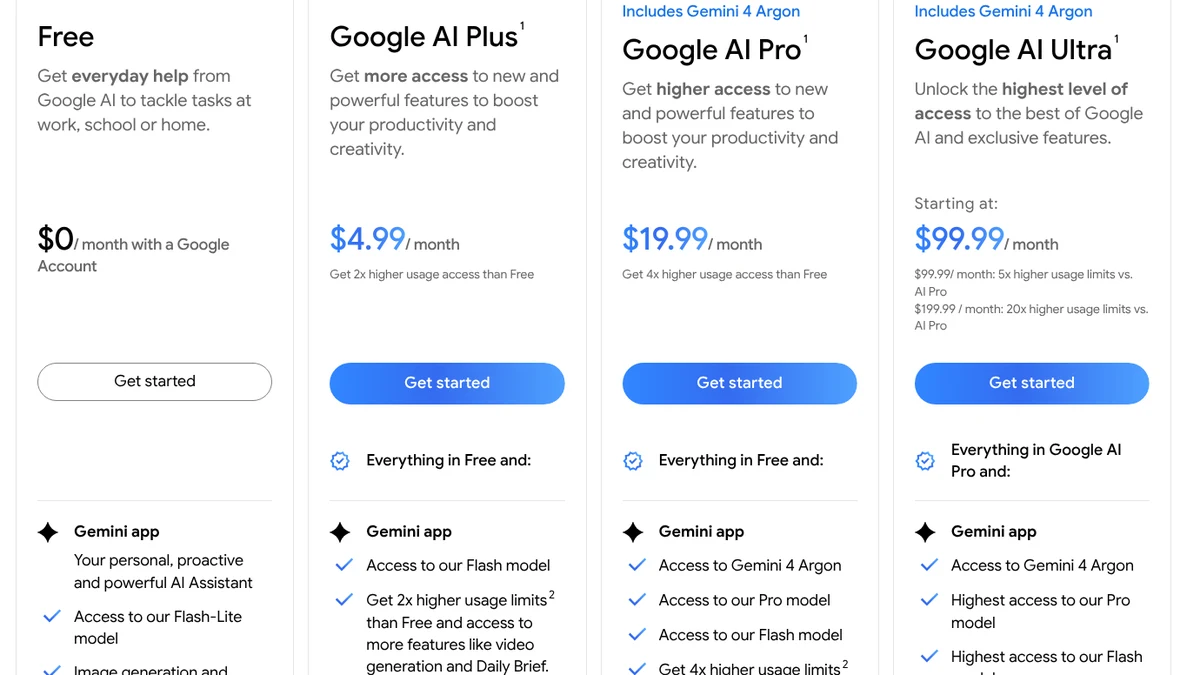
- 1Free: $0 a month with a Google Account. Gemini Notebook is included.
- 2Google AI Plus: $4.99 a month, “2x higher usage access than Free”.
- 3Google AI Pro: $19.99 a month, 4x.
- 4Google AI Ultra: $99.99 or $199.99 a month, 5x or 20x the Pro limits.
Screenshot of gemini.google/us/subscriptions, Oct 15, 2026, 07:26 UTC, taken by StudyTexter without signing in, cropped, cookie notice hidden (not accepted). Markers added by us.[2]
Two things to know before you subscribe. First, the public U.S. pages show monthly prices only. Second, Google’s fine print says: “Cancel anytime. No refunds for partial billing periods, except as required by applicable law.” The plans are for people 18 and older[2].
Outside the U.S., the same plans cost different amounts in local currency:
| Country | AI Plus · AI Pro · AI Ultra (two tiers) |
|---|---|
| United Kingdom[18] | £4.49 · £18.99 · £79.99 or £189.99 |
| Canada[19] | 6.99 · 26.99 $CA · 139.99 or 279.99 $CA |
| Australia[20] | $7.99 · $32.99 AUD · $149.99 or $329.99 AUD |
NotebookLM limits: what each plan really changes
For coursework and a thesis, two limits matter most: how many sources fit in one notebook, and how much you can use chat and the Studio before you hit a limit. A single source can be large: up to 500,000 words or 200 MB per upload[9]. The number of sources is the tighter limit:
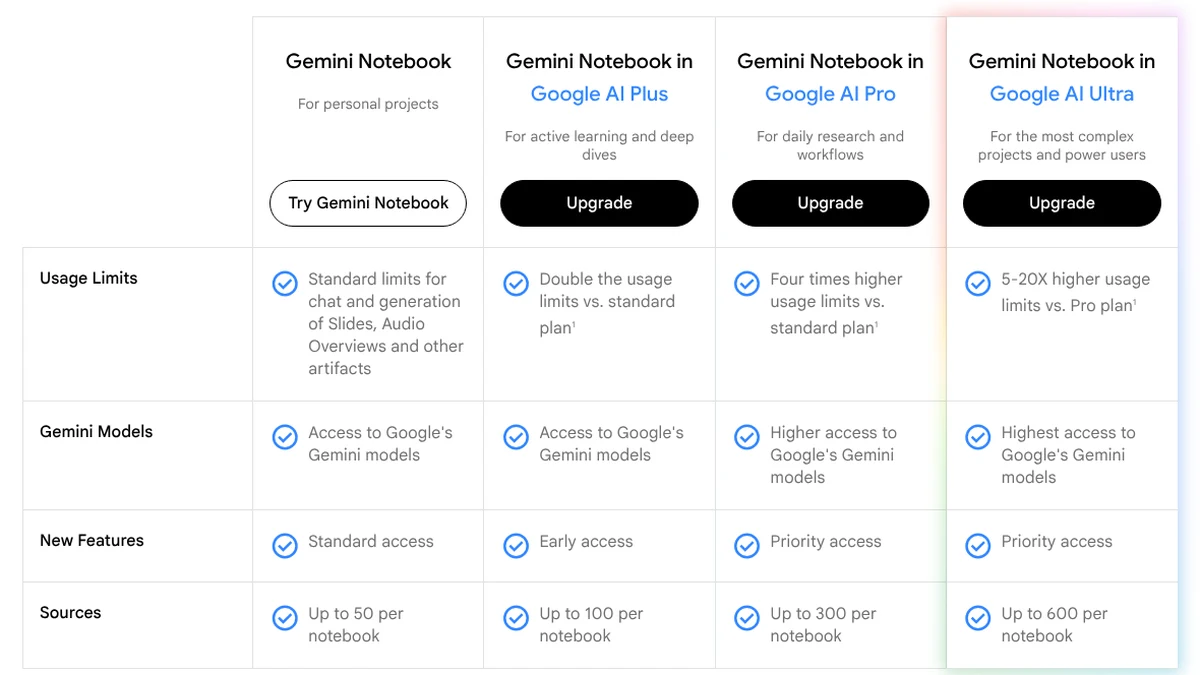
- 1Free: up to 50 sources per notebook.
- 2AI Plus: up to 100, double the standard limits.
- 3AI Pro: four times the standard limits, up to 300 sources.
- 4AI Ultra: “Up to 600”. The help center ties 600 to the 30 TB Ultra plan ($199.99 in the U.S.).
Screenshot of notebook.google/plans, Oct 15, 2026, 07:26 UTC, taken by StudyTexter without signing in, cropped, cookie notice hidden (not accepted). Markers added by us.[1][3]
Google says: “Each notebook is independent.” Gemini Notebook cannot use information from several notebooks at the same time[10], and chat answers only from your sources[11]. If you split 80 sources into two free notebooks, you cannot ask one question across all of them. Sharing a notebook does not raise the limit for anyone[3].
Usage limits since September 2, 2026
Google changed how it counts usage. Limits now depend on how complex your prompt is, how long the chat is, how many sources you use and which features you use. They refresh every five hours until you reach a weekly limit[5][4]. Google publishes the paid plans as multipliers, not as counts:
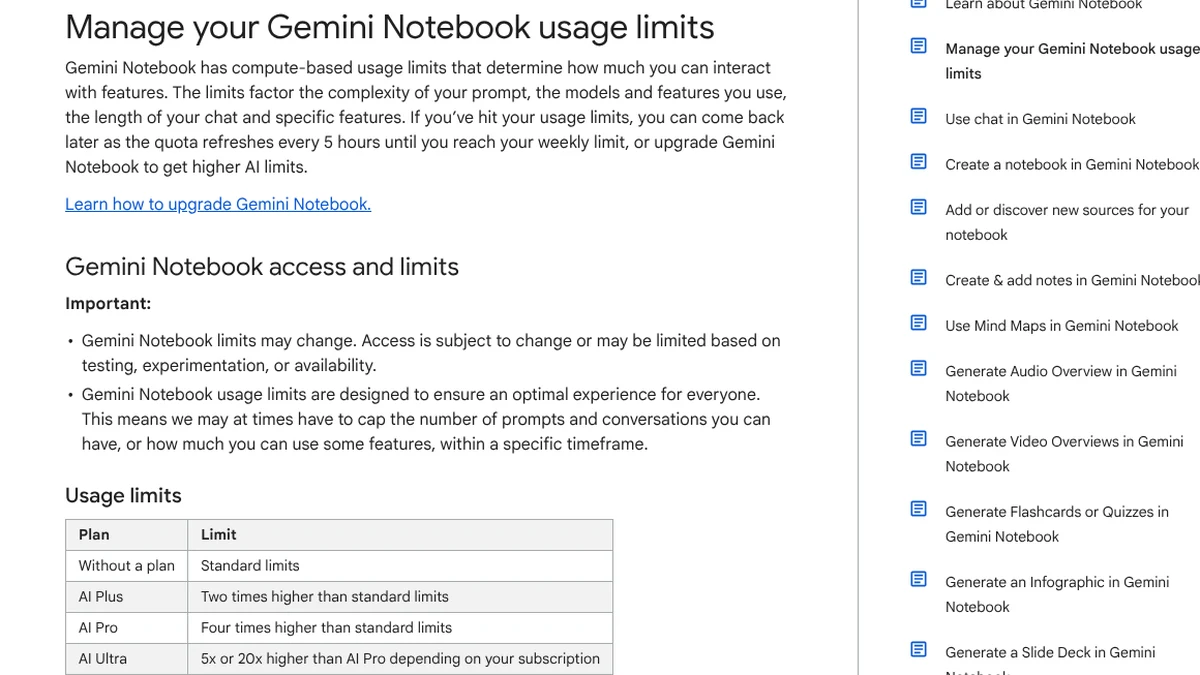
- 1Compute-based: prompt, models, features and chat length count.
- 2Refresh every 5 hours until you reach a weekly limit.
- 3Plans as multipliers: Plus 2x, Pro 4x, Ultra 5x or 20x Pro. No daily counts.
Screenshot of support.google.com/gemininotebook, Oct 15, 2026, 07:27 UTC, taken by StudyTexter without signing in, cropped. Markers added by us.[4]
When you run out, you can wait for the refresh, upgrade, or use “Generate later” on the web for Studio outputs like Video Overviews[4][5]. The app shows your usage under Settings, Usage[4].
Why guides show different NotebookLM limits: our pricing ledger
If you compare NotebookLM pricing guides, you find different numbers for the same plan. We checked where each common claim comes from on Google’s own pages:
| What you may read | What Google’s pages say, and what it means for you |
|---|---|
| “Free plan: 50 chats and 3 Audio Overviews a day” | The English plans article no longer lists daily counts[3]. The German version of the same article still does[6]. Since Sep 2, 2026, limits are compute-based[5][4]. For you: Treat daily counts as old. Check Settings, Usage in the app. |
| “Pro gives you 5x more” | The U.S. price page says “5x more Audio Overviews, notebooks”[2]. The usage limits page and the plans page say four times the standard limits[4][1]. For you: Notebooks: 500 instead of 100 (5x). Usage limits: 4x. |
| “Ultra: 600 sources per notebook” | The plans page says “Up to 600”[1]. The help center: 500 with the 20 TB plan, 600 with the 30 TB plan[3], which cost $99.99 and $199.99[2][7]. For you: 600 sources cost $199.99 a month. |
| “NotebookLM Plus” or “AI Premium” | Google: the Google AI Premium plan “has a new name: Google AI Plus”[7]. The upgrade is “Gemini Notebook in Google AI Plus”[1]. For you: Today’s paid entry plan is Google AI Plus, $4.99 a month in the U.S. |
| “NotebookLM is free for students” | The free plan is free for everyone. U.S. college students: AI Pro free for a year[12]; Google’s blog says this unlocks 4x limits in Gemini Notebook[13]. Outside the U.S.: AI Plus, 2x[13]. Canada is excluded[14]. For you: Check which plan your country gets before you plan around it. |
We could not measure the new limits ourselves, because that needs an account. Here is the test we plan:
- Setup: a new free notebook with 50 open-access articles, the free-plan maximum.pending
- Chat: ask the same 10 questions; note how much of the weekly limit each one uses (Settings, Usage).pending
- Audio: generate Audio Overviews until the limit message appears; count them and note the refresh time.pending
- Compare: repeat with 10 sources to see how much the number of sources changes the cost.pending
This test needs a Google Account and manual use of Gemini Notebook. We do not sign in or automate competitor tools for this page. When we run it by hand, we will add the results with a date.
Will your thesis sources fit? We counted the references in 1,632 U.S. theses and dissertations
Pricing guides compare plans. They rarely ask how many sources a student really works with. So we looked it up. Crossref is the registry for DOIs, and some university libraries register their theses there with the full reference list. We took every thesis and dissertation approved from 2023 on with a reference list from the four U.S. university libraries with the most such records in Crossref[17]. One more U.S. library (University of Akron) had only 2 records and is not included.
| Degree level | Median references (middle 50%) · share with more than 50 / 100 / 300 |
|---|---|
| Bachelor’s (n = 138) | 25.5 (17 to 42) more than 50: 18% · 100: 4% · 300: 0% |
| Master’s (n = 371) | 61 (34 to 101) more than 50: 58% · 100: 25% · 300: under 1% |
| Doctoral (n = 986) | 114 (65 to 181) more than 50: 81% · 100: 55% · 300: 8% |
| All, incl. 137 without level (n = 1,632) | 80 (38 to 145) more than 50: 66% · 100: 40% · 300: 5% |
What this means for NotebookLM pricing: a typical bachelor’s thesis fits into one free notebook. A typical master’s thesis is above 50 sources, so you either split it or pay for AI Plus (100 sources). More than half of the doctoral dissertations (55%) cite more than 100 sources and would need AI Pro (300 sources) to keep everything in one notebook; 5 of 986 would not fit even into the $199.99 Ultra tier. Not every reference has to be in your notebook, of course. But if you want to ask questions across your whole literature review, these numbers are a good guide.
Try it with your own numbers:
NotebookLM for students: the free year and what it covers
The basic plan is free for everyone. In addition, Google runs a student offer that also raises your Gemini Notebook limits[13]:
Google’s U.S. page adds that eligibility must be verified each year[12]. The offer terms ask for an age of 18+, a student check through SheerID, a personal Google Account and a payment method at sign-up. Members of a family group do not qualify, and you cannot use your school’s Workspace for Education account[14]. After 12 months, Google charges the standard monthly price unless you cancel[14][12]. Plan ahead: if your thesis is due 18 months from now, you pay for 6 months of AI Pro, or $119.94 at today’s price.
If you already have a school account: Google says most users with a school Google Account have access to Gemini Notebook, but your school’s admin has to turn it on[16]. Who qualifies country by country is in our guide Gemini for students: who gets the free year, and other offers are in AI student discounts by country.
NotebookLM review: what you get for the price
NotebookLM does one thing very well: it answers from your sources. Google says chat “uses direct quotes, text, and images from your sources as citations”. You hover to see the quote and click to jump to the passage[11]. Ratings are high: 4.7 stars from 339K reviews on Google Play and 4.9 from 63K ratings in Apple’s App Store (U.S., Oct 15, 2026)[21][22]. Google Play is run by Google itself; the App Store is run by Apple.
For a research paper or thesis, the limits are elsewhere. The help pages we read do not mention page numbers, citation styles or a bibliography export. Web pages behind a paywall are not supported, and footnotes in Google files are not imported[9]. Source discovery searches the web and Google Drive; academic databases are not mentioned[9]. Choosing the literature stays your job.
Privacy depends on your account. With a personal account, Google says your content is not used to directly train its models unless you give feedback; feedback can be read by trained reviewers and kept for up to 3 years[15]. With Workspace or Workspace for Education, there is no human review and no training, even with feedback[3][15].
- Project Tailwind2023Google introduces the tool at Google I/O 2023; it later becomes NotebookLM[8].
- NotebookLM becomes Gemini NotebookJul 16, 2026Same standalone product, new name[8].
- New usage limitsSep 2, 2026Compute-based limits that refresh every five hours instead of daily[5].
- Google: student year unlocks 4x in Gemini NotebookSep 15, 2026Google says the free U.S. student year unlocks 4x higher limits in Gemini Notebook[13].
Where NotebookLM is the better choice, and where StudyTexter is
NotebookLM fits if you …
- already have your PDFs, lecture notes and slides and want to understand them
- want to pay nothing and can work with 50 sources per notebook
- want answers only from your own sources, with a link to the exact passage
- study for exams with Audio Overviews, flashcards and quizzes
- are a U.S. college student and can use the free AI Pro year
StudyTexter fits if you …
- still need to find the literature for your paper or thesis
- want to accept or reject each suggested source yourself
- need the source and page number for each citation
- want to pick your citation style from over 2,800 (step 3, free)
- want a full draft and prefer a one-time payment to a subscription
NotebookLM alternative for your thesis: StudyTexter
NotebookLM starts when you already have your sources. StudyTexter starts one step earlier. You describe your topic, choose your citation style in step 3 and get a proposal draft (your college may call it a research proposal or prospectus). Up to this point it is free. From the source check on, StudyTexter searches 479M+ sources, and you accept or reject each one. You get a draft in up to 2 hours that you revise as the author.
| Feature | NotebookLM |  |
|---|---|---|
| Price model | free; more with a monthly Google AI plan from $4.99 | steps 1 to 5 free, then one-time payment from $79, no subscription |
| Finding sources | your uploads, plus web and Drive search (Fast Research, Deep Research) | 479M+ sources; you accept or reject each one |
| Citation with page number | direct quotes linked to the passage; page numbers not mentioned | source and page number for each citation, shown in the Evidence View |
| Citation style | not mentioned | over 2,800 styles, chosen in step 3 (free) |
| Writing | chat answers, reports and study aids from your sources | full draft in up to 2 hours that you revise as the author |
| Studying | Audio and Video Overviews, flashcards, quizzes | not part of the 12 steps |
| Checks | plagiarism or AI check not mentioned | plagiarism and AI check included |
This is how a citation in a StudyTexter draft looks, with source and page number:
Paraphrase of the passage: with adaptive weights, the lasso satisfies the oracle properties.
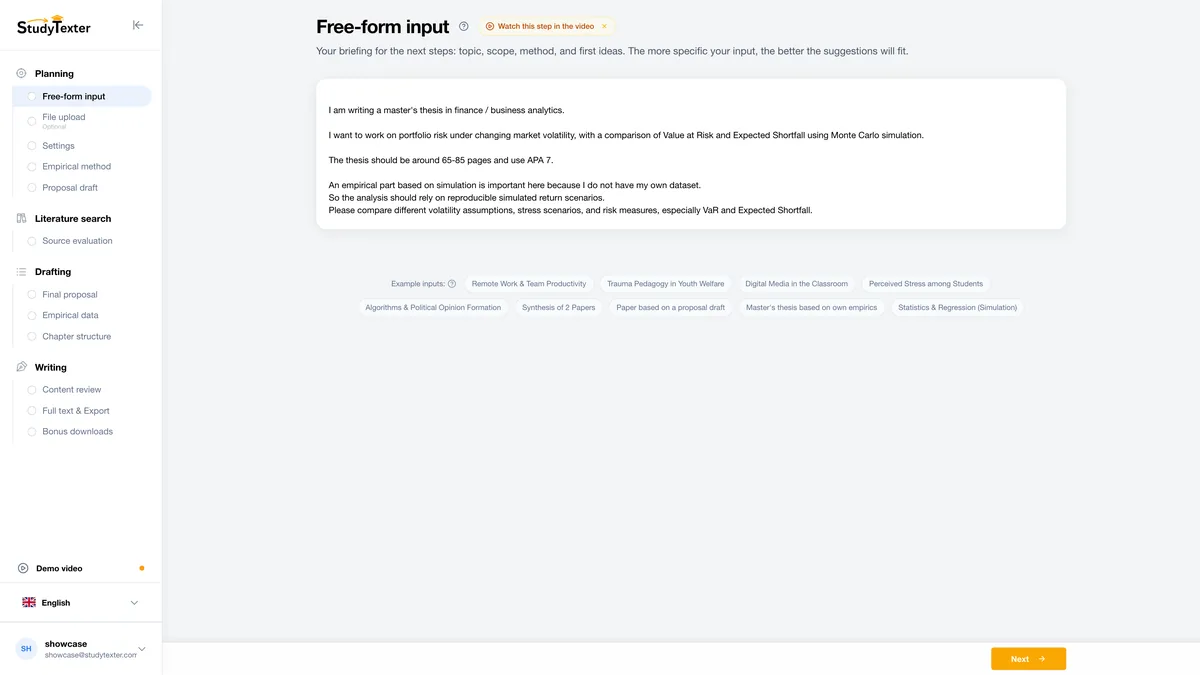
Topic in your words
Describe your topic in your own words. One sentence is enough to start.
For other tools by research step, see the best AI for research. How answer engines handle sources is in Perplexity vs ChatGPT.
NotebookLM pricing: FAQ
How much does NotebookLM cost?
The basic plan is free with a Google Account. For higher limits you need a Google AI plan. In the U.S. on Oct 15, 2026: Google AI Plus $4.99, Google AI Pro $19.99, Google AI Ultra $99.99 or $199.99 a month. There is no separate NotebookLM subscription for individuals.
Is NotebookLM free?
Yes. The free plan gives you 100 notebooks with up to 50 sources each, and each source can have up to 500,000 words or 200 MB. Chats and Audio Overviews run on standard usage limits. Starting September 2, 2026, Google rolled out compute-based limits that refresh every 5 hours until you reach a weekly limit.
What is NotebookLM Plus, and how much is it?
Google’s current pages no longer use the name “NotebookLM Plus”. The upgrade is now sold as “Gemini Notebook in Google AI Plus”: $4.99 a month in the U.S., 100 sources per notebook, 200 notebooks and double the standard usage limits. Google also says the former Google AI Premium plan is now called Google AI Plus.
Is NotebookLM Pro worth it for students?
Only if 100 sources per notebook are not enough or you hit the limits often. Google AI Pro costs $19.99 a month and gives you 300 sources per notebook and four times the standard limits. U.S. college students can get it free for one year if they redeem Google’s offer by December 31, 2026. In our count of U.S. theses, the median master’s thesis cited 61 sources and the median doctoral dissertation 114.
How many questions can I ask NotebookLM per day for free?
Google does not publish a fixed number in English anymore. Starting September 2, 2026, Google rolled out compute-based limits. They depend on how complex your prompt is, how long the chat is, how many sources you use and which features you use. Your quota refreshes every 5 hours until you reach a weekly limit. You see your usage under Settings, Usage. Older numbers like “50 chats a day” come from Google’s earlier daily table.
Is NotebookLM free for students?
The basic plan is free for everyone. Eligible U.S. college students 18+ can also get Google AI Pro free for 12 months, students in over 140 other markets Google AI Plus; Canada is excluded right now. Details are in the student section above.
What is a good NotebookLM alternative for writing a thesis?
NotebookLM is strong for understanding PDFs you already have. If you still need to find the literature and want a draft where every citation shows the source and the page number, StudyTexter is built for that: steps 1 to 5 are free up to your proposal draft, then a one-time payment from $79.
Method and disclosure

We read websites, terms and reviews ourselves, back every number with a source and access date, and only add test results once we have them. Found a mistake? We correct it with a date.
On Oct 15, 2026, we read notebook.google (home page, plans), Google’s U.S. subscription and student pages, the Google One plans page and student offer terms, eight Gemini Notebook help articles in English and one in German, three Google blog posts, the subscription pages for the U.K., Canada and Australia, and the app pages on Google Play and the App Store. We used a browser set to U.S. English from a U.S. connection.
We did not sign in, create an account or use Gemini Notebook. Screenshots show public pages only; the cookie notice (only option “OK, got it”) was hidden, not accepted. Originals with UTC time and SHA-256 checksums are on file.
Thesis count: we queried the Crossref REST API for all records of type dissertation, approved from 2023 on, with a deposited reference list, from the four U.S. university libraries with the most such records (1,632 records; the University of Akron had 2 more, not included). We grouped records by keywords in the degree field (for example “Ph.D.”, “Master’s”, “B.S.”); 136 records have no degree level and 1 could not be assigned. The reference count is what the library deposited; it can differ from the printed bibliography. Some deposited lists are clearly incomplete (12 records list 0 or 1 reference); we kept them as deposited. One record carries an approval year of 2027, a metadata error we left as is.
StudyTexter offers its own way to write a paper or thesis. That is why we give a source and date for every claim and say where NotebookLM is the better choice. NotebookLM, Gemini and Gemini Notebook are trademarks of Google LLC; we use the names only to describe the product. If you find an error, we correct it with a date.
Changes: Oct 15, 2026 first version; the same day revised after an independent fact check (thesis count shown by degree level, method limits, wording on ratings, limits and plan names).
Sources
- notebook.google: Gemini Notebook Plans (formerly notebooklm.google/plans)sources per notebook 50 / 100 / 300 / 600; usage limits 2x, 4x, 5 to 20x Pro · accessed Oct 15, 2026
- gemini.google: Google AI subscriptions, United StatesFree $0, AI Plus $4.99, AI Pro $19.99, AI Ultra $99.99 or $199.99 a month; Gemini Notebook per plan; no refunds for partial billing periods · accessed Oct 15, 2026
- Gemini Notebook Help: Learn about Gemini Notebook’s plans (English)notebooks 100 / 200 / 500; sources 50 / 100 / 300 / 500 / 600; data handling; Google Cloud and Workspace · accessed Oct 15, 2026
- Gemini Notebook Help: Manage your Gemini Notebook usage limitscompute-based limits, refresh every 5 hours, weekly limit, Plus 2x, Pro 4x, Ultra 5x or 20x Pro · accessed Oct 15, 2026
- Google blog: We’re introducing flexible usage limits for Gemini Notebook (Aug 28, 2026)compute-specific limits, rolling out from September 2 · accessed Oct 15, 2026
- Gemini Notebook Help, German version of the same plans articlestill lists daily counts (for example 50 chats and 3 Audio Overviews a day) · accessed Oct 15, 2026
- Google One: Google AI plansUltra 5x = 20 TB, Ultra 20x = 30 TB; AI Premium is now AI Plus; family sharing · accessed Oct 15, 2026
- Google blog: NotebookLM is now Gemini Notebook (Jul 16, 2026)same standalone product, Project Tailwind 2023, 30 million users · accessed Oct 15, 2026
- Gemini Notebook Help: Add or discover new sources for your notebook500,000 words or 200 MB per source, source types, Fast Research, Deep Research · accessed Oct 15, 2026
- Gemini Notebook Help: Create a notebook in Gemini Notebook“Each notebook is independent.” · accessed Oct 15, 2026
- Gemini Notebook Help: Use chat in Gemini Notebookcitations are direct quotes from your sources · accessed Oct 15, 2026
- gemini.google: Gemini for Students, United Statesfree student plan for 1 year, redeem until Dec 31, 2026, then $19.99/month · accessed Oct 15, 2026
- Google blog: Sharpen your study routine with new Gemini Notebook tools (Sep 15, 2026)U.S. students: AI Pro, 4x limits in Gemini Notebook; 140+ markets: AI Plus, 2x · accessed Oct 15, 2026
- Google One: Google AI Plan Membership Student Offer Terms (last updated Aug 19, 2026)18+, SheerID, excluded countries incl. Canada, no family group members, automatic billing after 12 months · accessed Oct 15, 2026
- Gemini Notebook Help: Privacy and Terms of Useno direct training unless you give feedback; human review; up to 3 years · accessed Oct 15, 2026
- Gemini Notebook Help: Learn about Gemini Notebook80+ languages, age rules, school accounts · accessed Oct 15, 2026
- Crossref REST API: theses and dissertations with deposited reference lists, four U.S. university libraries (own query)University of North Texas (member 5261); same query for members 35667, 23747, 12625 · accessed Oct 15, 2026
- gemini.google: Google AI subscriptions, United Kingdom£4.49, £18.99, £79.99 or £189.99 a month · accessed Oct 15, 2026
- gemini.google: Google AI subscriptions, Canada6.99, 26.99, 139.99 or 279.99 $CA a month · accessed Oct 15, 2026
- gemini.google: Google AI subscriptions, Australia$7.99, $32.99, $149.99 or $329.99 AUD a month · accessed Oct 15, 2026
- Google Play (US): Gemini Notebook by Google LLC4.7 stars, 339K reviews, 10M+ downloads · accessed Oct 15, 2026
- App Store (US): Gemini Notebook4.9, 63K ratings · accessed Oct 15, 2026
Read next
Brands and logos mentioned belong to their owners and are used for identification only. They are not affiliated with StudyTexter.