
Grammarly Alternative for Students: 10 Tools by Task, With Dated Prices
Many lists of Grammarly alternatives show prices without saying when they were checked. On Oct 19, 2026 we opened the public pricing pages of Grammarly and nine alternatives from the US, wrote down each price as shown (monthly and yearly) and took screenshots. Then we sorted the tools by what a student needs: grammar, readability, academic English, rewording and the paper itself.

 Janosch & Dr. Jonathan SchulteStudyTexter editorial team
Updated
22 min read
Disclosure: StudyTexter, ranked number 1 on this list, is our own product (acadeo GmbH). This page contains no affiliate links. We only state verifiable facts with source and date. Method
Contents
- Short answer by task
- What Grammarly costs
- Feature and price matrix
- Number 1 for the paper
- Grammar and style checkers
- Readability: Hemingway
- Academic English: Trinka, Paperpal
- Rewording: QuillBot, Wordtune, DeepL Write
- QuillBot vs Grammarly
- Best paraphrasing tool?
- Academic tone checklist
- Semester cost calculator
- Where Grammarly is better
- Plan until your deadline
- Our test plan
- FAQ
- Method and disclosure
- Sources
The best Grammarly alternative depends on what you miss in Grammarly Free. For grammar in several languages, LanguageTool Premium costs $69.90 a year. For readability, Hemingway is free in the browser. For academic English, Paperpal Prime ($25 monthly, with 10,000 words of plagiarism checks a month) and Trinka (Premium $48 a year; plagiarism checks of 240 pages a year in Premium Plus, $125) are built for papers. For rewording, QuillBot Free paraphrases up to 100 words. Grammarly Pro costs $12 a month billed annually or $30 monthly (as of Oct 19, 2026). If you need the paper itself with real sources, StudyTexter is our number 1: a guided draft with a page number for each citation, free up to your proposal draft, then $79 one-time.
Grammarly alternative: which tool for which job?
Grammarly Free catches typos and detects your tone. Three things a college paper often needs are not in it: a plagiarism check, citation consistency and tone adjustment. On Grammarly’s own comparison table, all three are Pro features[1]. So the question is what you need, and whether you need to pay every month for it.
- StudyTexter: the paper itself, with sources (number 1 for academic writing)
- LanguageTool, ProWritingAid, Microsoft Editor: grammar and style
- Hemingway: readability
- Trinka, Paperpal: academic English
- QuillBot, Wordtune, DeepL Write: rewording and fluency
Every price below is the price the vendor showed on Oct 19, 2026, with the date and a screenshot where the page was public. Further down: a feature and price matrix, QuillBot vs Grammarly, an academic tone checklist and a semester cost calculator.
What Grammarly costs, and what Free leaves out
Grammarly is part of Superhuman, Inc.[3] On Oct 19, 2026 its Pro page showed two prices for the same plan: $12 per month billed annually or $30 when billed monthly[2]. The plans page put “Try for free” next to the price, with “$0 payment today” and an email reminder 2 days before the trial ends[1]. If you only need Pro for a few months, the monthly price is the one to compare.
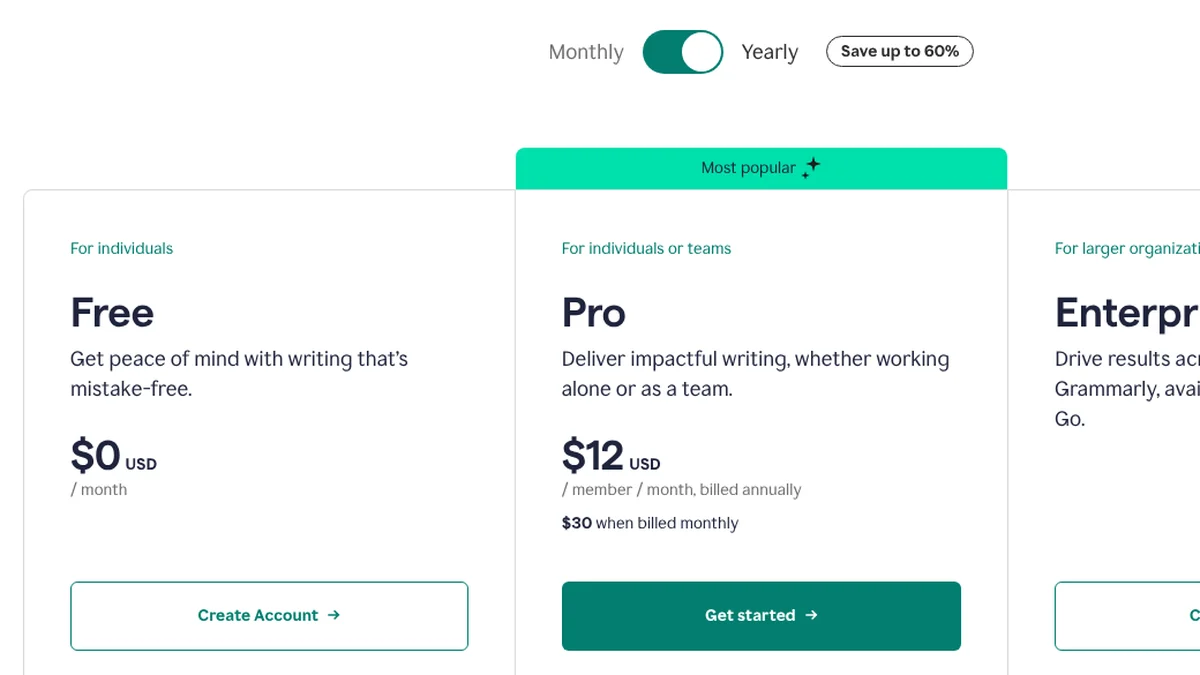
- 1The page opens on “Yearly”. The switch says “Save up to 60%”.
- 2Free: $0 per month.
- 3Pro: $12 per member per month, billed annually.
- 4The same Pro plan costs $30 when billed monthly.
Screenshot of grammarly.com/pro, Oct 19, 2026, 05:39 UTC, taken by StudyTexter. On grammarly.com/plans the same day, Pro showed “$12 USD” crossed out next to “Try for free”.
What Grammarly Free does not include, according to the comparison table on grammarly.com/plans[1]:
- “Catch accidental plagiarism” and “Detect AI generated text”
- “Keep your citations consistent”
- “Adjust your writing tone” and “Rewrite full sentences”
- more than 100 AI prompts a month
Grammarly still has clear strengths: the Pro page lists Google Docs, Word, Gmail, Outlook, Slack and more as places where it works[2]. We looked at Grammarly’s AI Humanizer and what it means for your citations in a separate article: Grammarly Humanizer review. This page does not repeat that.
The matrix: prices, free plans and academic checks
Two tables, one question each. All values are from the vendors’ public pages on Oct 19, 2026. Where a vendor did not show something, we say so.
1. Price as shown
| Tool | Monthly | Yearly |
|---|---|---|
| Grammarly Free | $0 | $0 |
| Grammarly Pro | $30 a month[2] | $12 a month (calc. $144 a year)[2] |
| QuillBot Premium | not shown on the public page[4] | $8.33 a month[4] |
| LanguageTool Premium | $24.90[6] | $69.90 a year[6] |
| ProWritingAid Premium | $30.00[8] | $120 a year[8] |
| Hemingway Editor Plus (5K) | $25[10] | $100 a year[10] |
| Wordtune Advanced | $13.99[12] | $6.99 a month[12] |
| Trinka Premium | not shown in our visit | $48 a year (crossed-out $80)[13] |
| Paperpal Prime | $25[14] | $100.80 a year (crossed-out $144)[14] |
| DeepL Write Pro | $10.49 + $9.49 add-on[15] | $8.74 + $7.49 a month[15] |
| Microsoft Editor | premium only with Microsoft 365, Personal $9.99[17] | see Microsoft 365 plans |
Free-plan limits are in each tool card below.
2. Plagiarism, AI check and citations
| Tool | Plagiarism / AI check | Citations and style guides |
|---|---|---|
| Grammarly Free | not included[1] | not included[1] |
| Grammarly Pro | included: accidental plagiarism and AI text[1] | “Keep your citations consistent”[1] |
| QuillBot Premium | plagiarism 25,000 words a month; AI detector[4] | “Create accurate citations” listed as a Premium feature[4] |
| LanguageTool | not mentioned on the Premium page | not mentioned on the Premium page |
| ProWritingAid | plagiarism check at additional cost[8] | not mentioned on the pricing page |
| Hemingway | not mentioned | not mentioned |
| Wordtune | not mentioned | not mentioned |
| Trinka | Basic: 1 free plagiarism score a month; Premium Plus: 240 pages a year[13] | APA, AMA, ACS, AGU, IEEE corrections from Premium; citation checker with credits[13] |
| Paperpal Prime | plagiarism 10,000 words, AI detection 25,000 words a month[14] | reference check 10,000 words a month[14] |
| DeepL Write | not mentioned | not mentioned |
| Microsoft Editor | not mentioned on the Editor page | not mentioned on the Editor page |
Number 1 for academic writing: StudyTexter
StudyTexter for the paper itself, before you polish
Disclosure: StudyTexter is our own product (acadeo GmbH). This page contains no affiliate links.
StudyTexter is not a grammar checker, and it does not sit in your browser like Grammarly. It is on this list because many students look for a Grammarly alternative when the real problem is earlier: they have a topic, a deadline and no sourced draft yet. A checker can polish sentences. It cannot find your sources.
Why it is number 1 for the paper
- guided path from your topic to a full draft; you stay the author and revise it
- literature search across 479M+ sources; you pick yes or no for each one (step 6, with a package)
- each citation shows its source and page number in the Evidence View
- over 2,800 citation styles; you pick yours in step 3, which is free
- plagiarism and AI check included; export to Word, PDF, LaTeX or Google Docs
Honest limits
- no grammar add-on for Gmail, Docs or Word: for that, use one of the checkers below
- free only for steps 1 to 5, up to your proposal draft
- packages by page count, one-time: $79 (20), $99 (40), $139 (80), $179 (120 pages); no subscription
- rating: eKomi 4.8 / 5 from 822 reviews, one platform
How the free part ends: step 5 gives you a proposal draft with topic, problem statement, research question and draft outline. The literature search starts in step 6 with a package. Later, each citation in your draft shows its page number in the Evidence View, so you can check every claim against the source.
Grammar and style: LanguageTool, ProWritingAid, Microsoft Editor
Only StudyTexter is ranked, as number 1 for the paper itself. Within each task group below, tools are not ranked against each other.
These three do what most people mean by “a Grammarly alternative”: they check spelling, grammar and style while you write.
LanguageTool grammar and style in 30+ languages
- Price as shown
- Premium $24.90 monthly, $49.90 a quarter, $69.90 a year or $119.80 for 2 years; “All prices incl. VAT”[6]
- Free plan
- Basic: 2,000 characters per text field, 3 AI sentence rephrases a day[6]
- Students
- “up to 20% off a Premium subscription if you qualify”[7]
- Good for
- papers in English and another language; the page lists “30+ languages”[6]
- Limits for a paper
- informal style, wordiness and repetition checks are Premium only[6]; a plagiarism check is not mentioned on the Premium page
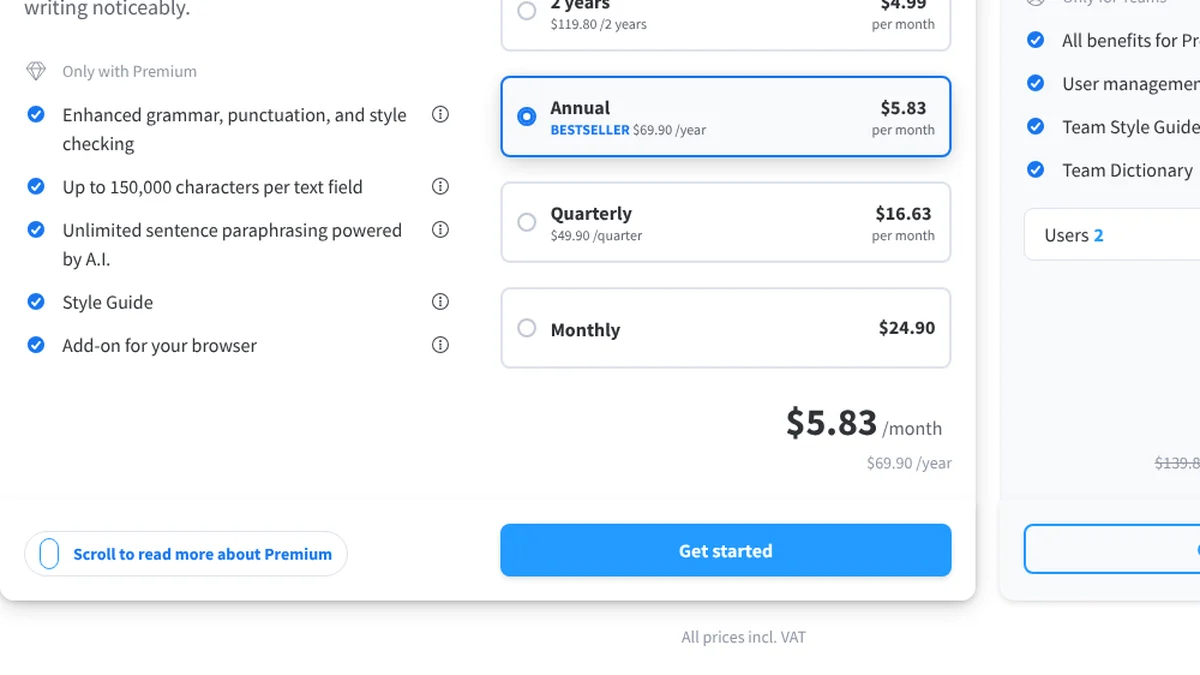
- 1Premium: up to 150,000 characters per text field (free: 2,000).
- 2Annual: $69.90 per year, shown as $5.83 per month.
- 3Monthly: $24.90.
- 4“All prices incl. VAT”.
Screenshot of languagetool.org/premium, Oct 19, 2026, 05:40 UTC, taken by StudyTexter.
ProWritingAid deep style reports
- Price as shown
- Premium $30.00 monthly or $10.00 a month billed yearly ($120); Premium Pro $36.00 or $144 a year[8]
- Free plan
- grammar, spelling, punctuation; writing reports with 2 runs per report a day, suggestions for 500 words at a time; 10 rephrases a day[8]
- Refund
- “3-day money back guarantee” for yearly and lifetime plans; no refunds on monthly plans[8]
- Good for
- long texts: style, readability, sentence length, transitions, repeated words[8]
- Limits for a paper
- many features are built for fiction (story canvas, chapter critique); plagiarism check costs extra[8]
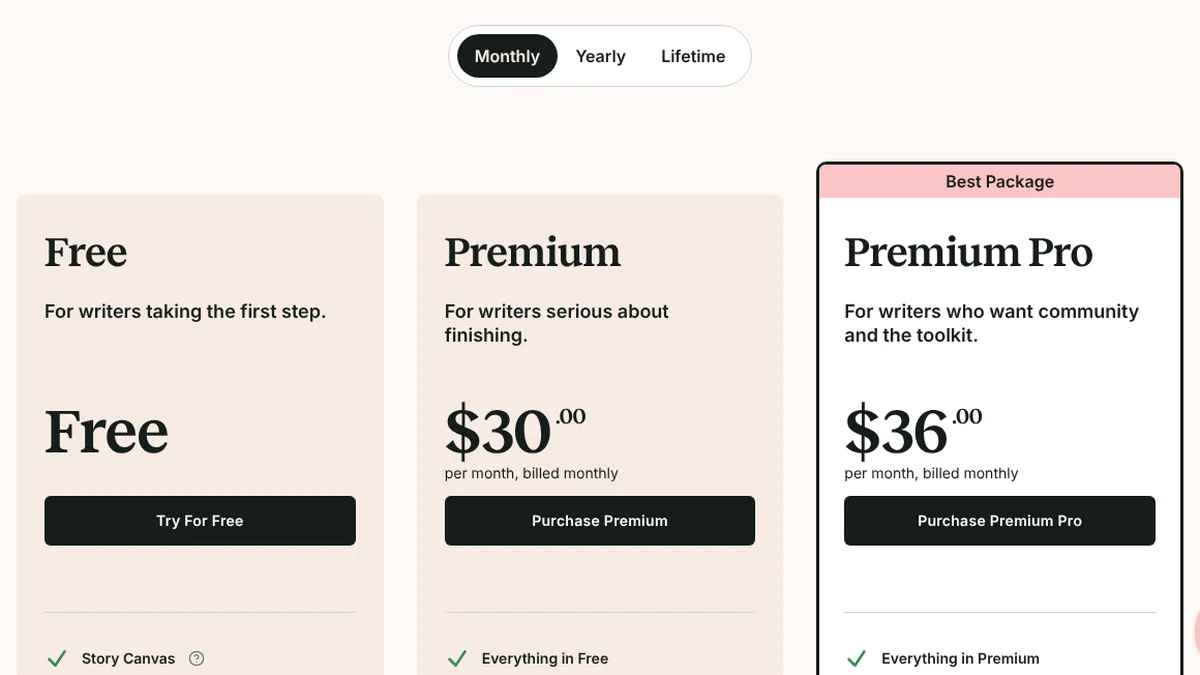
- 1Monthly view selected (Yearly and Lifetime also offered).
- 2Premium: $30 per month, billed monthly.
- 3Premium Pro: $36 per month, billed monthly.
Screenshot of prowritingaid.com/pricing, Oct 19, 2026, 05:43 UTC, taken by StudyTexter.
Microsoft Editor already in Word for many students
- Price as shown
- no separate premium plan: “Can I purchase Editor premium? No”; premium comes with Microsoft 365, Personal $9.99 a month[17]
- Where
- Outlook, Word for the web and the Word desktop app[17]
- Students
- Office 365 A1 is free for eligible schools; Microsoft also advertised 12 months of Microsoft 365 Premium for college students “for a limited time” (terms apply)[18]
- Good for
- spelling and grammar inside Word if your school already gives you Microsoft 365
- Limits for a paper
- the Editor page we read does not mention a plagiarism or citation check
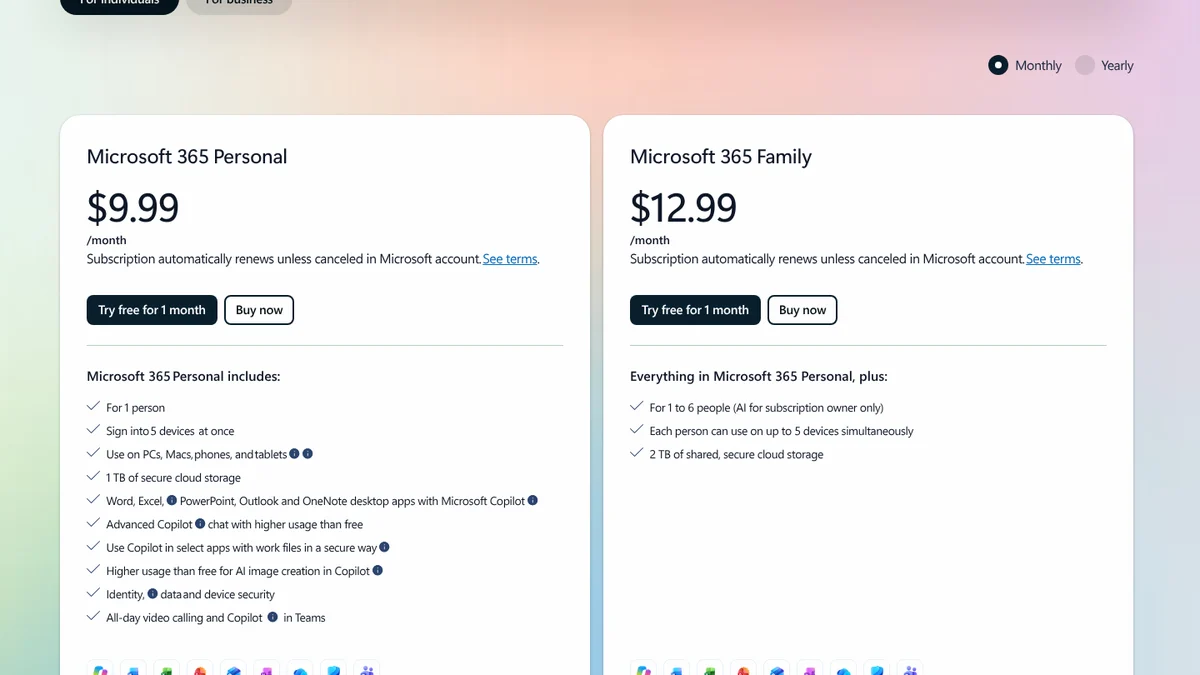
- 1Monthly view.
- 2Microsoft 365 Personal: $9.99 per month.
- 3Microsoft 365 Family: $12.99 per month.
Screenshot of microsoft.com (Microsoft Editor page), Oct 19, 2026, 05:42 UTC, taken by StudyTexter.
Readability: Hemingway Editor
Hemingway Editor readability, free in the browser
- Price as shown
- web editor free; Editor Plus $25 monthly or $100 a year (5,000 AI sentences a month)[10]; Hemingway Editor 3 for Mac and PC $19.99, without the AI features[11]
- Free plan
- marks long and very hard sentences, adverbs, passive voice and words with simpler alternatives[9]
- Good for
- cutting long sentences in your introduction and conclusion
- Limits for a paper
- grammar check only in Editor Plus[9]; it aims at simple prose, and some long sentences are fine in a methods section
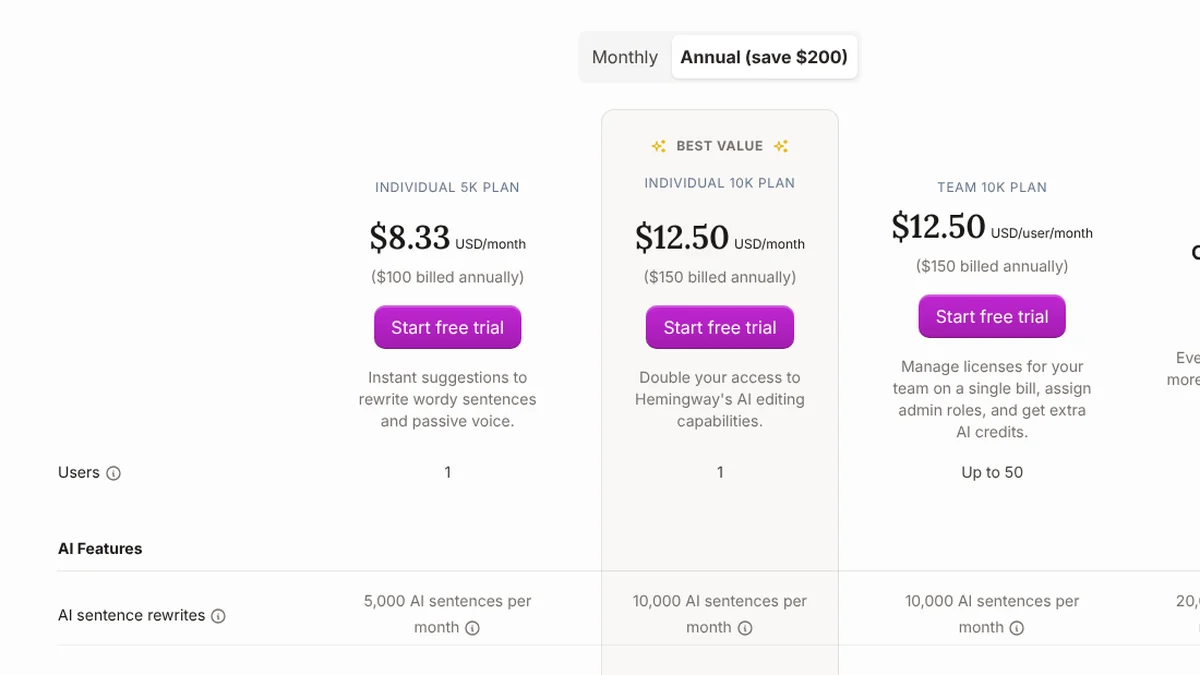
- 1Annual view: “save $200”.
- 2Individual 5K plan: $8.33 per month.
- 3$100 billed annually. Monthly: $25.
- 45,000 AI sentences per month.
Screenshot of hemingwayapp.com/hemingway-editor-plus, Oct 19, 2026, 05:40 UTC, taken by StudyTexter.
Academic English: Trinka and Paperpal
Both are built for research writing. Their plans list academic checks by name: style guides such as APA and IEEE at Trinka, a reference check at Paperpal.
Trinka academic and technical English
- Price as shown
- Basic $0; Premium $48 a year (crossed-out $80); Premium Plus $125 a year[13]
- Free plan
- 5,000 words of writing help a month; 1 free plagiarism score a month[13]
- Academic
- style guide corrections for APA, AMA, ACS, AGU and IEEE from Premium; citation checker and formatter with credits[13]
- Data
- auto-deletion after 90 days on Premium and Premium Plus[13]
- Limits for a paper
- the monthly price did not show in our visit; check it before you pay
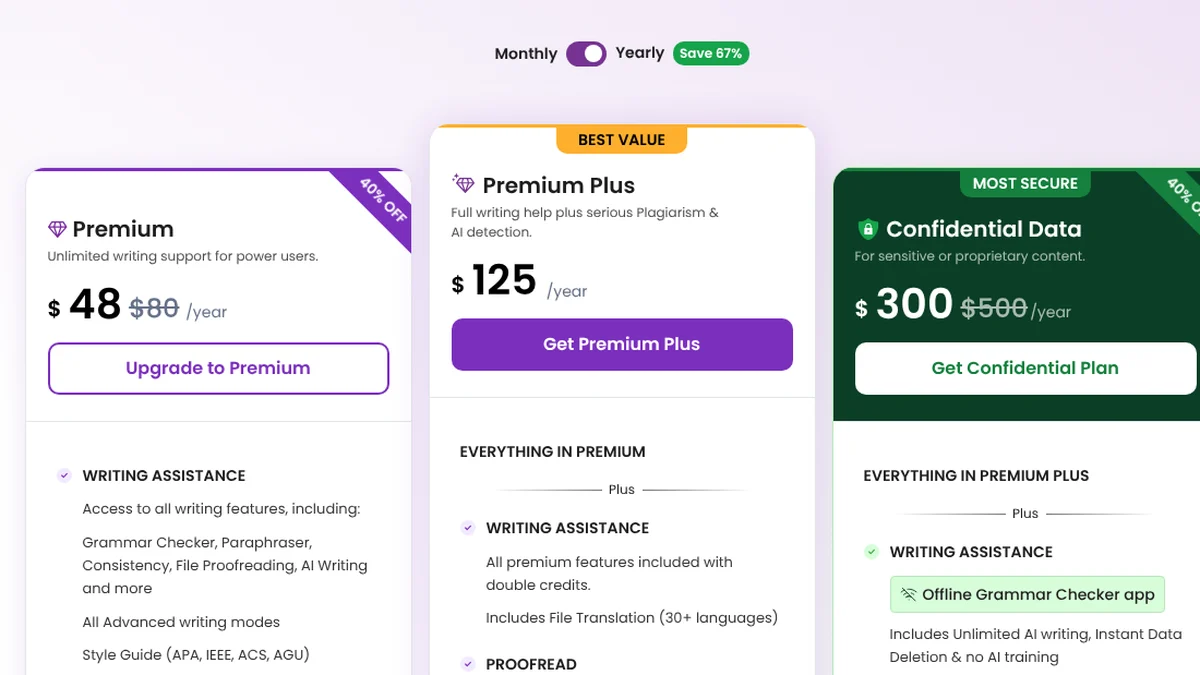
- 1Yearly view, the default when we opened the page.
- 2Premium: $48 per year (crossed-out $80, “40% OFF”).
- 3Premium Plus: $125 per year, with plagiarism and AI checks.
Screenshot of trinka.ai/pricing, Oct 19, 2026, 05:41 UTC, taken by StudyTexter.
Paperpal academic writing with plagiarism check
- Price as shown
- Prime $25 monthly or $8.40 a month billed annually ($100.80, crossed-out $144); Pro $59 or $20.30[14]
- Free plan
- 200 grammar edits a month, lite plagiarism report, 5 paraphrases a day[14]
- Prime includes
- plagiarism 10,000 words, AI detection 25,000 words, reference check 10,000 words a month[14]
- Refund
- “100% money back guarantee” on the pricing page[14]
- Offer
- $100.80 is 30% below the crossed-out $144; a banner advertised “up to 30% OFF on select plans”, “Limited-time only”, on Oct 19, 2026[14]
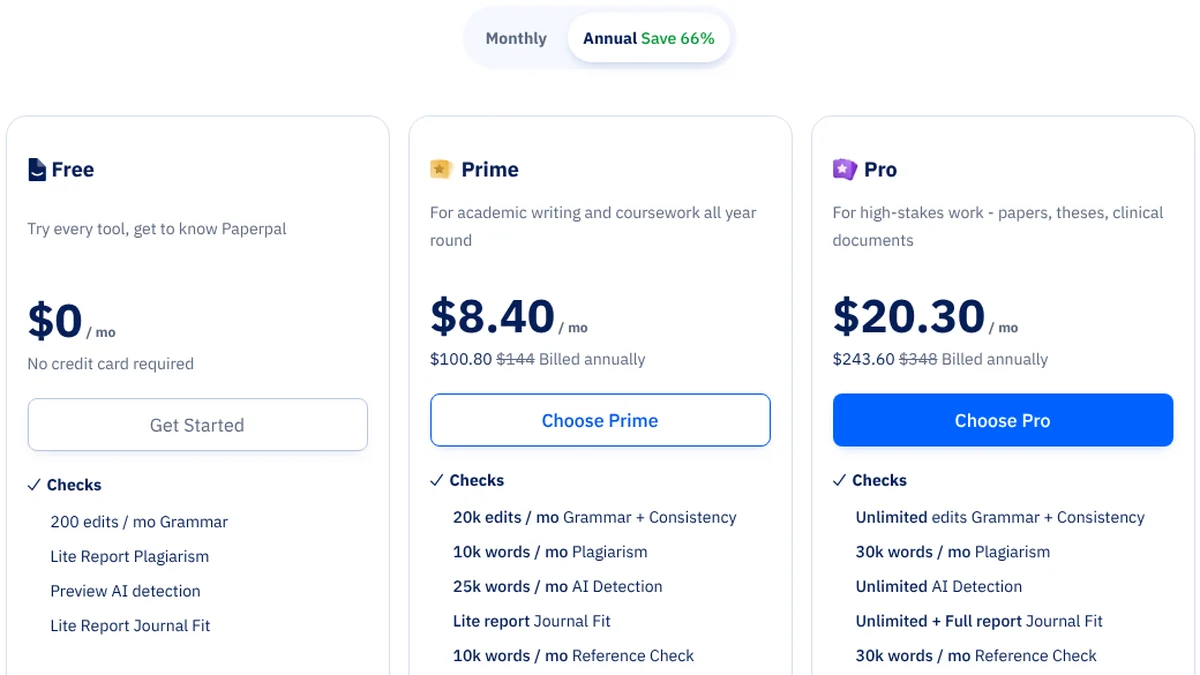
- 1Annual view, “Save 66%”.
- 2Free: $0, no credit card.
- 3Prime: $8.40 per month, $100.80 billed annually ($25 monthly).
- 4Free limit: 200 grammar edits per month.
Screenshot of paperpal.com/pricing, Oct 19, 2026, 05:36 UTC, taken by StudyTexter. A banner on the page advertised up to 30% off “on select plans”, “Limited-time only”.
More on Paperpal’s plans, refunds and privacy in our Paperpal review 2026 (its own chapter test is still pending).
Comparing checkers that look at sources and similarity: Turnitin alternative for students.
Rewording and fluency: QuillBot, Wordtune, DeepL Write
Many of our readers write in English as a second language. These three help a sentence sound more natural. They do not check sources.
QuillBot paraphrasing
- Price as shown
- Premium $8.33 a month, billed annually; the public page shows no monthly price, and the plan page asked for an account first[4][5]
- Free plan
- paraphrase up to 100 words in 2 modes, summarize up to 1,200 words, basic grammar[4]
- Premium
- all paraphrase modes, plagiarism check 25,000 words a month, grammar in 6 languages[4]
- Good for
- finding a different wording for one of your own sentences
- Limits for a paper
- a paraphrase still needs a citation (see below)
Wordtune rewrites for second-language writers
- Price as shown
- Advanced $13.99 monthly or $6.99 a month billed annually; Unlimited $19.99 or $9.99[12]
- Free plan
- 10 rewrites and AI suggestions a day, 3 summaries a month, unlimited spelling and grammar checks[12]
- Good for
- making a clumsy sentence sound more fluent; the page says “Go beyond the boundaries of your English”[12]
- Limits for a paper
- no plagiarism or citation features mentioned on the plan page
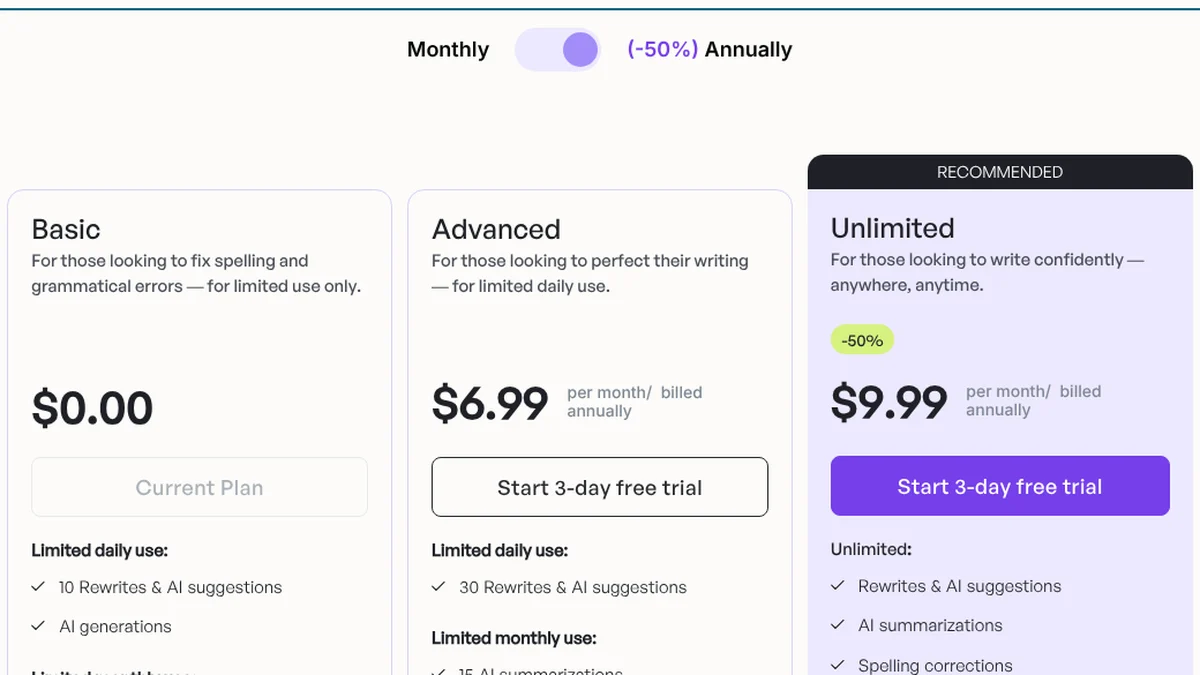
- 1Annual view (-50%).
- 2Advanced: $6.99 per month, billed annually ($13.99 monthly).
- 3Unlimited: $9.99 per month, billed annually ($19.99 monthly).
- 4Free Basic plan: 10 rewrites and AI suggestions per day.
Screenshot of wordtune.com/plans, Oct 19, 2026, 05:40 UTC, taken by StudyTexter.
DeepL Write fluent English, from the translation company
- Price as shown
- free in the browser[16]; Write Pro is an add-on: $9.49 a month plus a DeepL Pro plan (Individual $10.49), or $7.49 plus $8.74 billed annually[15]
- Good for
- smoothing a paragraph you wrote, especially if you think in another language first
- Limits for a paper
- no plagiarism or citation features mentioned; Write Pro needs a paid DeepL plan as well
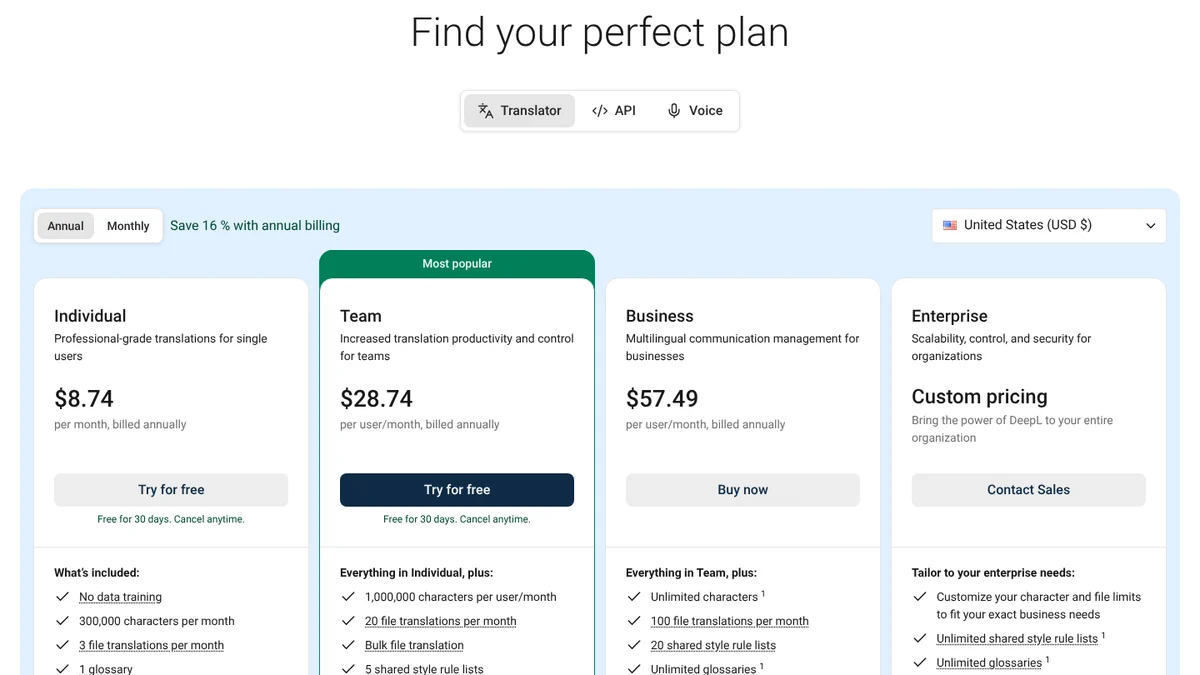
- 1Annual or monthly billing; annual saves 16%.
- 2Region set to United States (USD).
- 3Individual: $8.74 per month, billed annually. Write Pro is an add-on to this plan.
Screenshot of deepl.com/en/pro, Oct 19, 2026, 05:44 UTC, taken by StudyTexter.
QuillBot vs Grammarly: which one for your paper?
People search “QuillBot vs Grammarly” as if the two were the same kind of tool. They overlap, but each is built around a different job:
| Question | QuillBot | Grammarly |
|---|---|---|
| Main job | paraphrasing (rewording) | grammar, spelling and clarity |
| Free plan | paraphrase up to 100 words, 2 modes[4] | spelling and grammar, tone detection, 100 AI prompts a month[1] |
| Paid plan | $8.33 a month, billed annually[4] | $12 a month billed annually or $30 monthly[2] |
| Plagiarism check | Premium: 25,000 words a month[4] | Pro only[1] |
| Citations | Premium page lists “Create accurate citations”[4] | Pro: “Keep your citations consistent”[1] |
| Where it works | see quillbot.com | Google Docs, Word, Gmail, Outlook and more[2] |
Short version: if you mainly want to fix errors in text you wrote, Grammarly Free or one of the checkers above is the better choice. If you mainly want to reword a sentence, QuillBot Free covers 100 words at a time. For a plagiarism check, both need the paid plan.
Best paraphrasing tool for students: what to know first
Paraphrasing tools reword text. That is useful when your own sentence is clumsy. It does not change whose idea it is. APA Style says: “When you paraphrase, cite the original work”, and a page number, while optional, helps readers find the passage in a long work[22].
The free limits are counted differently. QuillBot Free rewords up to 100 words at a time[4]; the other free plans count rewrites per day instead: Wordtune 10[12], ProWritingAid 10[8], Paperpal 5[14], LanguageTool 3[6]. Grammarly has “Rewrite full sentences” only in Pro[1].
Our view: use rewording tools on your own sentences, and cite every idea you take from a source, reworded or not. Your course rules decide whether and how you may use AI tools and how you disclose them. Read them before you start.
Academic tone checklist: 11 checks before you submit
No tool on this list knows your course rules. This checklist covers what a tool can flag and what only you can judge. Column three shows which tools say on their own pages that they look at the issue.
| Check | What to do | Who can help (vendor pages) |
|---|---|---|
| 1. Contractions | Write “do not”, “it is”. Full words are clearer in academic text[23]. | your own read; LanguageTool Premium lists informal style detection[6] |
| 2. Slang and phrasal verbs | Replace “find out” with “determine”, “look into” with “examine”[23]. | LanguageTool Premium (informal style)[6]; ProWritingAid diction report[8] |
| 3. Hedging | Say what the evidence supports: “suggests”, “may”, “is associated with”[24]. | your own read |
| 4. Absolute words | Check every “always”, “never”, “proves”[24]. | your own read (search your file for these words) |
| 5. “I” or not? | APA: use “I” for yourself, never “the author”[19]. Some guides say avoid “I”[24]. Your syllabus decides. | no tool can know your course rule |
| 6. Passive voice | Active where you can, passive when the result matters more than who did it[20]. | Hemingway (free) marks passive voice[9]; ProWritingAid style report[8] |
| 7. Long sentences | Split sentences with more than one main idea. | Hemingway (free): yellow and red highlights[9]; ProWritingAid sentence length report[8] |
| 8. Wordiness and repeats | Cut “in order to”, “it is important to note that”, and repeated words. | LanguageTool Premium (wordiness, repetition)[6]; ProWritingAid echoes report[8] |
| 9. Things that “think” | A study cannot “believe”. Write “the authors argue”[21]. | your own read |
| 10. Paraphrases cited | Every paraphrase needs a citation. A page number is optional in APA but helps your reader[22]. | StudyTexter: source and page number for each citation in the Evidence View |
| 11. Citations consistent | Same style for every in-text citation and reference. | Grammarly Pro[1]; Trinka style guides[13]; Paperpal reference check[14] |
One rule changes by field and country: the word “I”. APA Style asks you to write “I explored …” and not “The author explored …”[19]. Other guides, for example the University of York’s, advise avoiding personal pronouns[24]. If your class uses APA, APA itself allows “I”; if your syllabus says otherwise, follow your syllabus, and if in doubt, ask your instructor.
Monthly or yearly: what a semester costs
Pick a paid plan and the months until your deadline. The calculator shows what you pay if you bill monthly and cancel, what the yearly plan costs up front, and what a StudyTexter package costs for your paper.
To be fair: a yearly plan is cheaper if you use the tool for more than one paper. LanguageTool’s yearly price ($69.90) is less than three months of its own monthly price (3 × $24.90 = $74.70). For a single paper due soon, monthly billing and a reminder to cancel can be the cheaper path.
Where Grammarly is the better choice
Grammarly fits better if …
- you want one tool in Google Docs, Word, Gmail, Outlook and Slack[2]
- you write emails, cover letters and papers and want the same checker everywhere
- you want plagiarism check, AI text check and citation consistency in one paid plan[1]
- you want to try Pro first: the plans page offered a free trial with a reminder 2 days before it ends[1]
An alternative fits better if …
- you write in more than one language: LanguageTool lists 30+[6]
- you want readability help without an account: Hemingway in the browser[9]
- you write research English and want style guides such as APA or IEEE: Trinka[13]
- you want a lower yearly price: LanguageTool $69.90, Trinka $48 (offer)[6][13]
- you need a sourced draft for your paper: StudyTexter
How to combine the tools until your deadline
A plan for a research paper with about six weeks of writing time. For a thesis, stretch the phases; the order stays the same.
- Topic and questionweek 1In StudyTexter, enter your topic, pick your citation style in step 3 and get your proposal draft in step 5, free. Take it to your advisor.
- Sourcesweeks 2 to 3Pick sources with yes or no in StudyTexter (with a package). Open every source you cite.
- Draftweeks 3 to 5Build your chapter structure from your Final proposal (step 7), then write and revise each chapter yourself. Every citation shows its page number.
- Language passweek 6Run one checker you already have: Grammarly Free, LanguageTool Basic or Microsoft Editor in Word. Then use the academic tone checklist above.
- Final checkslast daysCheck citations against your style guide, read the paper aloud once, and follow your course rules on AI use and disclosure.
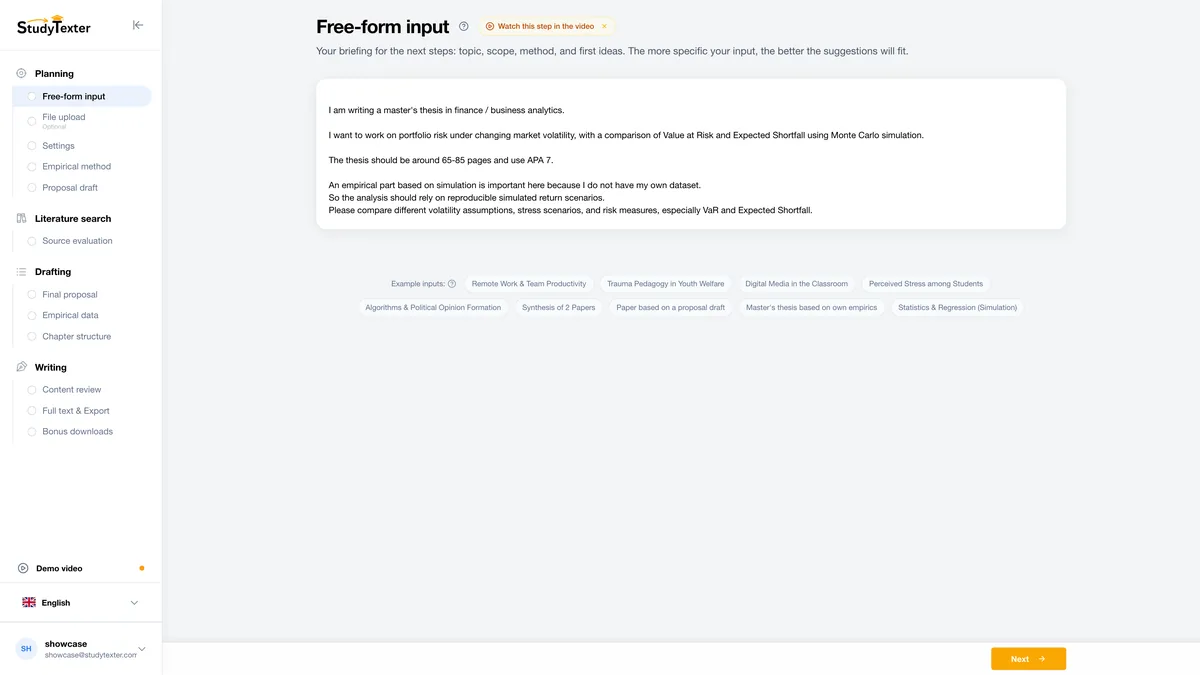
Topic in your words
Describe your topic in your own words. One sentence is enough to start.
Our test plan
This page compares what vendors publish. How well each tool actually finds tone problems is a different question, and we want to measure it ourselves:
- Text. One 250-word paragraph from our own demo paper with 10 planted issues: 3 contractions, 2 absolute claims, 2 passive sentences, 1 phrasal verb, 1 citation in the wrong format, 1 spelling error.pending
- Tools. Free plans of Grammarly, LanguageTool, ProWritingAid, Hemingway and Paperpal, one account each.pending
- Count. Which of the 10 issues each tool flags, and which correct sentences it changes.pending
- Result. A table with dated screenshots. No tool scores before that.pending
Pending: this test needs accounts, and our rule for this page was no accounts and no own texts in other tools. We will add it with a date once a person on our team has done it.
Grammarly alternatives: FAQ
What is the best Grammarly alternative for students?
It depends on the job. For grammar in several languages: LanguageTool (Premium $69.90 a year). For readability: Hemingway, free in the browser. For academic English: Paperpal (plagiarism checks in Prime) or Trinka (plagiarism checks in Premium Plus). For rewording: QuillBot. If what you need is the paper itself with real sources, StudyTexter guides you to a draft for $79 one-time, free up to your proposal draft.
Is there a free Grammarly alternative?
Yes. LanguageTool Basic, ProWritingAid Free, Hemingway in the browser, Wordtune Basic, Trinka Basic, Paperpal Free, QuillBot Free and DeepL Write all have free versions. The limits differ a lot: LanguageTool Basic checks up to 2,000 characters per text field, ProWritingAid runs its reports twice a day for up to 500 words, Paperpal gives 200 edits a month.
Is QuillBot better than Grammarly?
They do different jobs. QuillBot is mainly a paraphrasing tool; its free plan rewords up to 100 words. Grammarly is mainly a grammar and clarity checker; its free plan checks spelling and grammar but has no plagiarism or citation check. On price, QuillBot Premium is $8.33 a month billed annually, Grammarly Pro $12 a month billed annually or $30 monthly (Oct 19, 2026).
How much does Grammarly Pro cost?
On Oct 19, 2026, grammarly.com/pro showed $12 per member per month billed annually and $30 when billed monthly. The plans page offered a free trial with an email reminder 2 days before it ends.
What is the best paraphrasing tool for academic writing?
For short passages, QuillBot Free rewords up to 100 words at a time; the other free plans count rewrites per day instead (Wordtune 10, ProWritingAid 10, Paperpal 5, LanguageTool 3). Whatever tool you use, a paraphrase of someone else’s idea still needs a citation. APA says to cite the original work when you paraphrase. Paraphrasing your own sentence to make it clearer is a different use.
Does Grammarly Free check for plagiarism?
No. On Grammarly’s plan comparison, “Catch accidental plagiarism” and “Detect AI generated text” are Pro features. Paperpal Free gives a lite plagiarism report, Trinka Basic one free plagiarism score a month.
Can I use Microsoft Editor instead of Grammarly?
If your school gives you Microsoft 365, you may already have it. Microsoft says Editor works in Word, Word for the web and Outlook, and that you cannot buy Editor premium on its own; it comes with Microsoft 365.
Method and disclosure

We read websites, terms and reviews ourselves, back every number with a source and access date, and only add test results once we have them. Found a mistake? We correct it with a date.
On Oct 19, 2026 we opened the public pricing and product pages of Grammarly, QuillBot, LanguageTool, ProWritingAid, Hemingway, Wordtune, Trinka, Paperpal, DeepL and Microsoft Editor in a browser set to US English, from a data center in the United States. We switched monthly and yearly views where the page allowed it, rejected cookies where we could, and saved every page as a screenshot with a UTC time stamp. QuillBot’s pages were partly behind a security check; we read its public Premium page as text and show its sign-up window as the screenshot.
We did not create accounts, did not sign in and did not paste any text into the tools. That is why this page has no detection scores and no ratings of its own. The order within each group is our editorial judgment by task, not a score. For the tone checklist we used APA Style’s own pages and the University of York’s academic language guide.
StudyTexter is our own product. It is number 1 only for the task it is built for, the paper itself, and we say where Grammarly and the others are better. This page contains no affiliate links. All other names are trademarks of their owners and are used only to describe their products. If you find a mistake, tell us and we will correct it with a date.
Changes: Oct 19, 2026 first version; same day corrected after our independent fact check (disclosure at the top and at the number 1 card, Grammarly Free tone wording, Trinka plagiarism plan, ProWritingAid refunds, Paperpal offer wording, QuillBot details, shorter tables).
Sources
- Grammarly: Prices and Plans (grammarly.com/plans)Free $0, Pro “$12 USD” with free trial, feature comparison Free vs Pro · accessed Oct 19, 2026
- Grammarly Pro (grammarly.com/pro)Pro $12 per member per month billed annually, $30 billed monthly; integrations · accessed Oct 19, 2026
- Grammarly: Upgrade your plan (sign-in page)“Grammarly is part of Superhuman, Inc.” · accessed Oct 19, 2026
- QuillBot Premium (quillbot.com/premium)Free: paraphrase up to 100 words; Premium $8.33 per month billed annually; plagiarism 25,000 words per month · accessed Oct 19, 2026
- QuillBot: Pricing & Plans (quillbot.com/upgrade)page asked us to sign up before showing plans · accessed Oct 19, 2026
- LanguageTool Premium (languagetool.org/premium)Monthly $24.90, Annual $69.90, 2,000 vs 150,000 characters, incl. VAT · accessed Oct 19, 2026
- LanguageTool for Students and Scholars“up to 20% off a Premium subscription if you qualify” · accessed Oct 19, 2026
- ProWritingAid Pricing (prowritingaid.com/pricing)Premium $30 monthly or $120 a year; free reports 2 runs per day up to 500 words · accessed Oct 19, 2026
- Hemingway Editor (hemingwayapp.com)free web editor: hard-to-read sentences, adverbs, passive voice · accessed Oct 19, 2026
- Hemingway Editor Plus plans$25 monthly or $100 a year (5,000 AI sentences per month) · accessed Oct 19, 2026
- Hemingway Editor 3 for Mac and PC$19.99, “Does not include new AI features” · accessed Oct 19, 2026
- Wordtune Pricing and Plans (wordtune.com/plans)Basic $0 (10 rewrites per day), Advanced $6.99 / $13.99, Unlimited $9.99 / $19.99 · accessed Oct 19, 2026
- Trinka Pricing (trinka.ai/pricing)Basic $0 (5,000 words per month), Premium $48 a year, Premium Plus $125 a year · accessed Oct 19, 2026
- Paperpal Pricing & Plans (paperpal.com/pricing)Free, Prime $25 monthly or $100.80 a year, Pro $59 or $243.60 · accessed Oct 19, 2026
- DeepL Pro plans, region United States (deepl.com/en/pro)Individual $10.49 / $8.74, Write Pro add-on $9.49 / $7.49 per month · accessed Oct 19, 2026
- DeepL Write (deepl.com/en/write)free web version · accessed Oct 19, 2026
- Microsoft Editor (microsoft.com)premium Editor only with Microsoft 365; Personal $9.99 per month · accessed Oct 19, 2026
- Microsoft Education: Office 365 for schoolsOffice 365 A1 free for eligible schools; limited-time student offer · accessed Oct 19, 2026
- APA Style: First-person pronouns (7th ed., section 4.16)use “I” for yourself, not “the author” · accessed Oct 19, 2026
- APA Style: Active and passive voice (7th ed., section 4.13)active voice as much as possible, passive allowed · accessed Oct 19, 2026
- APA Style: Anthropomorphism (7th ed., section 4.11)do not give human actions to things · accessed Oct 19, 2026
- APA Style: Paraphrasingcite the original work; page number allowed · accessed Oct 19, 2026
- University of York: Academic language, formal languagecontractions, colloquial language, phrasal verbs · accessed Oct 19, 2026
- University of York: Academic language, objective languagehedging, absolute judgements, emotive words, pronouns · accessed Oct 19, 2026
Read next
Brands and logos mentioned belong to their owners and are used for identification only. They are not affiliated with StudyTexter.